|
What Is a HubSpot ERP Integration?
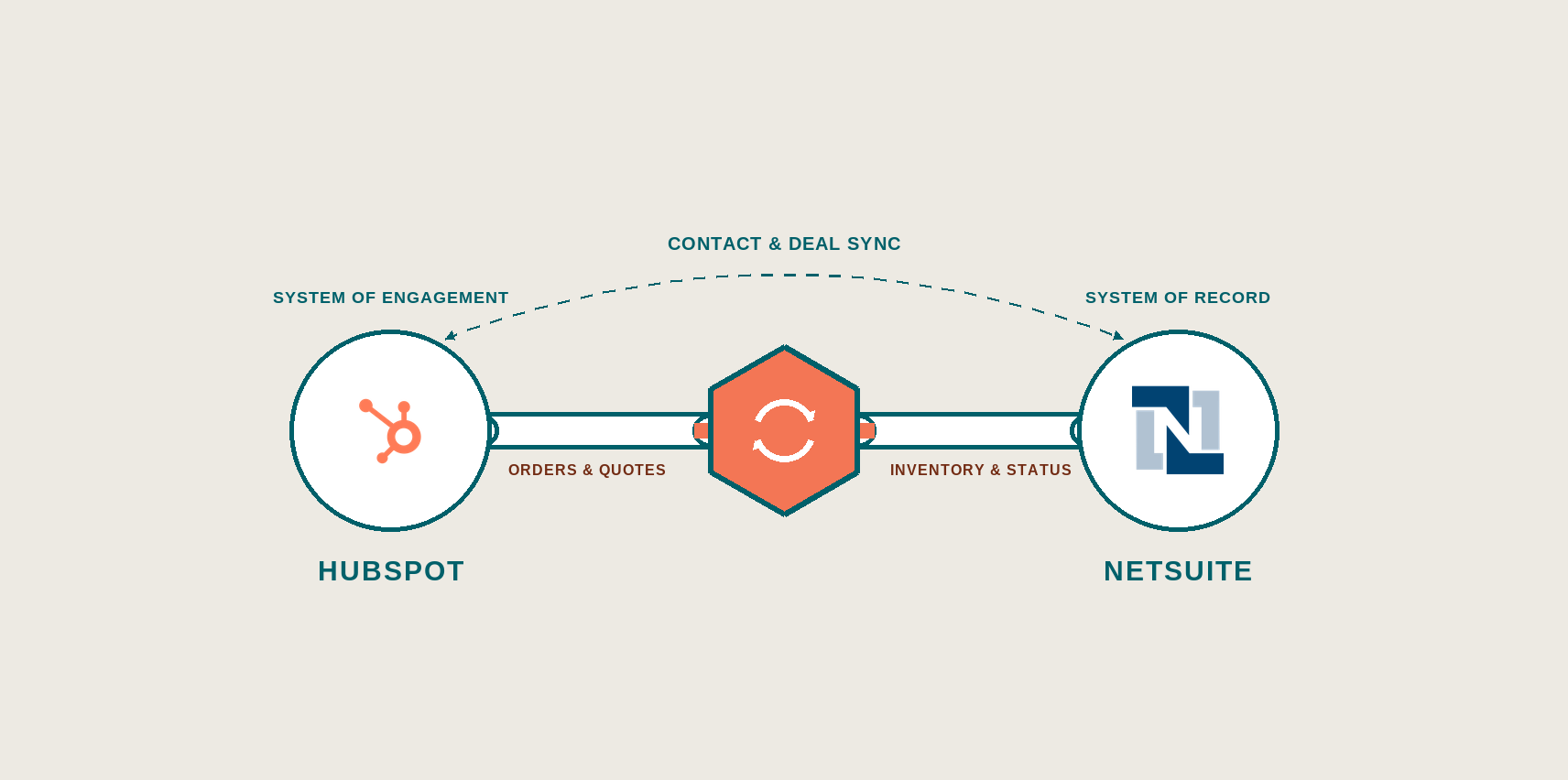
A HubSpot ERP integration is a data connection that lets HubSpot and an ERP share customer, order, and quote records without replacing either system. HubSpot stays the system of engagement; the ERP stays the system of record. |
HubSpot manages relationships. Your ERP manages fulfillment and finance.
Most industrial companies get into trouble not because they misunderstand the split, but because they try to integrate the two systems before they’ve agreed on who owns what data, and what “customer” even means across departments. This article covers what a HubSpot-ERP integration involves in the industrial space, the scenarios that come up most, and what to get right before anyone writes a line of code.
Key Takeaways
- HubSpot manages relationships; your ERP manages fulfillment and finance. Integration connects them — it does not merge them into one system.
- Poor data quality, often caused by siloed, unintegrated systems, costs organizations an average of $12.9 million per year (Gartner).
- The most common integration failure point is undefined data ownership and misaligned process going into the build.
Why Do You Need to Integrate HubSpot with an ERP?
Industrial companies need HubSpot-ERP integration because their businesses run on two systems that were never designed to talk to each other. NetSuite, SAP, Epicor, or whatever platform handles inventory, production, and financials wasn’t built to track a sales conversation. HubSpot wasn’t built to manage a bill of materials.
Without integration, the two systems drift. Sales quotes a lead time that doesn’t match what’s on the floor. Finance closes the books on numbers that don’t reconcile with what’s in the pipeline. Each team ends up trusting its own system and distrusting the other’s.
This is a Technology-engine problem in the Industrial Growth System, but it doesn’t get solved by technology alone.
|
Our Experience
We’ve seen companies buy the integration before they’ve named who owns the data or agreed on what a “customer” record means across departments. What happens is the build works fine, but the overall system doesn’t because Strategy and People weren’t in place first. Most of our ERP work sits in NetSuite, Microsoft Dynamics, Epicor, and Infor Syteline. The pattern that keeps repeating: the native connector covers maybe 70% of what a client actually needs, and the remaining 30% (list fields, line items, a property that drives commission) is where the real build is. We plan for the hybrid from the start rather than discovering it in week six. |
The Core Principle of a HubSpot-ERP Integration
The core principle of a HubSpot-ERP integration is division of labor. HubSpot is the system of engagement, your ERP is the system of record, and the integration is the layer between them — not a replacement for either.
|
A system of engagement tracks how a business interacts with people (emails, calls, deal stages, quotes in progress. A system of record holds the operational facts (inventory counts, purchase orders, invoices, production schedules). |
Most industrial businesses that try to run their ERP as a CRM end up with a sales team working out of spreadsheets because an ERP has no mechanism for tracking a relationship. Most that try to run HubSpot as an ERP end up with inventory numbers nobody trusts because HubSpot was never meant to manage physical stock.
Neither system should stretch to cover the other’s job. The integration is what lets each one stay in its lane and still share what the other needs.
An integrated setup means a sales rep can see order history and stock status without leaving HubSpot, and the ERP can trigger a CRM workflow the moment a quote turns into a purchase order, without anyone re-keying anything.
4 Common HubSpot-ERP Integration Use Cases
The most common integration use cases are bidirectional contact and account sync, deal-to-order handoffs, quote data exchange, and ERP-triggered CRM workflows. They each solve a different handoff problem between sales and operations.
|
Use Case |
What Syncs |
Why It Matters |
|
Bidirectional contact / account sync |
Customer and company records between HubSpot and the ERP |
Keeps one version of the customer instead of four conflicting ones |
|
Deal-to-order handoff |
Closed-won deals convert into ERP sales orders |
Removes manual re-entry and the errors that come with it |
|
Quote data exchange |
Pricing, product configuration, and quote status |
Lets reps quote against real inventory and lead times, not guesses |
|
ERP-triggered CRM workflows |
Order status, shipment, or invoice events push updates into HubSpot |
Keeps sales and service informed without checking a second system |
Not every industrial company needs all four. A distributor with a short sales cycle might only need contact sync and order status. A manufacturer with complex configured products usually needs quote data flowing both directions before anything else matters.
Build a Revenue System That Works Together
This whitepaper gives manufacturing and industrial teams a clear framework for planning custom HubSpot integrations, defining data flow, system ownership, and scalable integration strategies before development begins.
What Middleware Options Connect HubSpot to an ERP?
Four approaches connect HubSpot to an ERP: native marketplace connectors, iPaaS middleware, custom API builds, and hybrid architectures that combine a native connector with a custom layer. In industrial environments the hybrid is the most common outcome, whether or not it was the plan going in.
- Native connectors are the fastest route when your ERP has a pre-built HubSpot integration and your process fits the standard field mapping. They’re limited when your workflows don’t.
- Custom API builds give full control over logic and field-level behavior, which matters for complex quote-to-order flows, but they take longer to build and carry more long-term maintenance.
- iPaaS platforms sit in between. They handle much of the connection logic without a full custom build, and they’re a common fit when a business needs more flexibility than a native connector offers but doesn’t need a fully bespoke system.
- Hybrid architectures pair a native connector for the easy syncs (contacts, accounts, basic order status) with a custom layer for the parts that don't fit a standard mapping, like configured quotes or multi-entity ERPs.
Cloud-based solutions have become more common as businesses look for scalable, centralized ways to manage data without added hardware investment, which is part of why hybrid architectures have become the default for mid-sized industrial companies rather than a full custom build.
Rhetorical question worth sitting with before you pick one: Is the goal a system that works today, or one your team can still maintain in three years without calling the original developer?
Which ERPs Does HubSpot Integrate With?
HubSpot integrates with essentially any ERP that exposes an API, including NetSuite, Microsoft Dynamics 365, Epicor, Infor Syteline, Acumatica, and SAP. A few have native marketplace connectors, but industrial integrations almost always end up as a hybrid — the native connector handling standard objects, with a custom layer for the fields and records the connector can't reach.
Netsuite
NetSuite has a native HubSpot connector that handles companies, contacts, deals, orders, and products well. Where it stops short is NetSuite list-type fields, which don't register as syncable, and sub-records like line items. Those require a custom layer, typically SuiteScript and RESTlets on the NetSuite side paired with HubSpot custom code actions.
Microsoft Dynamics 365
Dynamics integrations usually hinge on property mapping: Dynamics and HubSpot structure account and contact data differently enough that the mapping document matters more than the connector. Custom Dynamics deployments, common in industrial environments, almost always need a custom build rather than an off-the-shelf sync.
Epicor
Epicor is typically a custom integration. Its data model doesn't map cleanly onto HubSpot's standard objects, particularly around quoting and order management, which is exactly where industrial companies need the sync to work.
Infor Syteline
Syteline environments are often on-premise or hybrid-hosted, which changes the integration approach before you get to field mapping. Access method and security posture get decided first; the sync design follows.
Acumatica
Acumatica's API is modern and well-documented, which makes it more approachable than legacy on-premise ERPs. Data ownership still needs settling first. The platform being easier to connect to doesn't remove the governance work.
Why Do HubSpot-ERP Integrations Fail?
Almost never because of the technology. Most failures trace back to undefined data ownership, unmapped fields, and misaligned process before development even starts.
What to Get Right Before You Map HubSpot to Your ERP
Before you map any field between HubSpot and your ERP, get four things settled: entity mapping, sync direction, reporting source, and field-level ownership.
|
Get This Right |
What It Means in Practice |
|
Entity Mapping |
Which ERP tables (customer master, item master, sales order, invoice) map to which HubSpot objects and properties, decided before anyone builds the sync |
|
Sync Direction |
Whether each field flows one-way or two-way, which system initiates the update, and whether it syncs in real time or on a schedule |
|
Reporting Source |
Which numbers get reported from the ERP (revenue, backorders, quote-to-cash) versus HubSpot (pipeline, attribution), decided before the dashboards get built |
|
Field-Level Ownership |
Not just "HubSpot owns contacts, the ERP owns orders" — which system wins when the same field (price, quantity, customer status) exists in both |
None of this is glamorous work, and none of it shows up in a sales demo. It’s also the difference between an integration that holds and one you’ll be re-scoping in a year.
Integrate HubSpot with Your ERP the Right Way
A HubSpot-ERP integration isn't a technology decision first. It's a data and ownership decision that technology later executes. Get governance, mapping, and lifecycle definitions settled before you scope the build, and the integration has a real shot at holding. Skip that groundwork, and you'll have a fast, well-built connector faithfully moving bad information between two systems that still don't agree.