HubSpot MCP: The Bridge Between Your AI Agents and HubSpot Data
Quick Answer: What is HubSpot MCP?HubSpot MCP (Model Context Protocol) is a framework that allows AI tools to securely access and interact with HubSpot CRM data. It enables natural language queries, eliminates the need for custom integrations, and provides structured, permission-based access to CRM objects for both users and developers. |
AI tools are only as useful as the data they can reach. And for most teams, that data is sitting in HubSpot — technically accessible, but not in a way that works naturally with the AI tools you're already using every day.
HubSpot just made it significantly easier to close that gap.
If you've heard the term "MCP" floating around lately but aren't sure what it actually means — or why HubSpot building their own matters — you're in the right place. What most people don't realize is that HubSpot actually ships two different MCP servers, each solving a different problem. This post breaks down both.
HubSpot MCP isn't just a developer feature — it's the infrastructure layer that lets AI actually work with your CRM data, whether you're querying it in plain English or building apps on top of it.
What Is HubSpot MCP and How Does It Work?
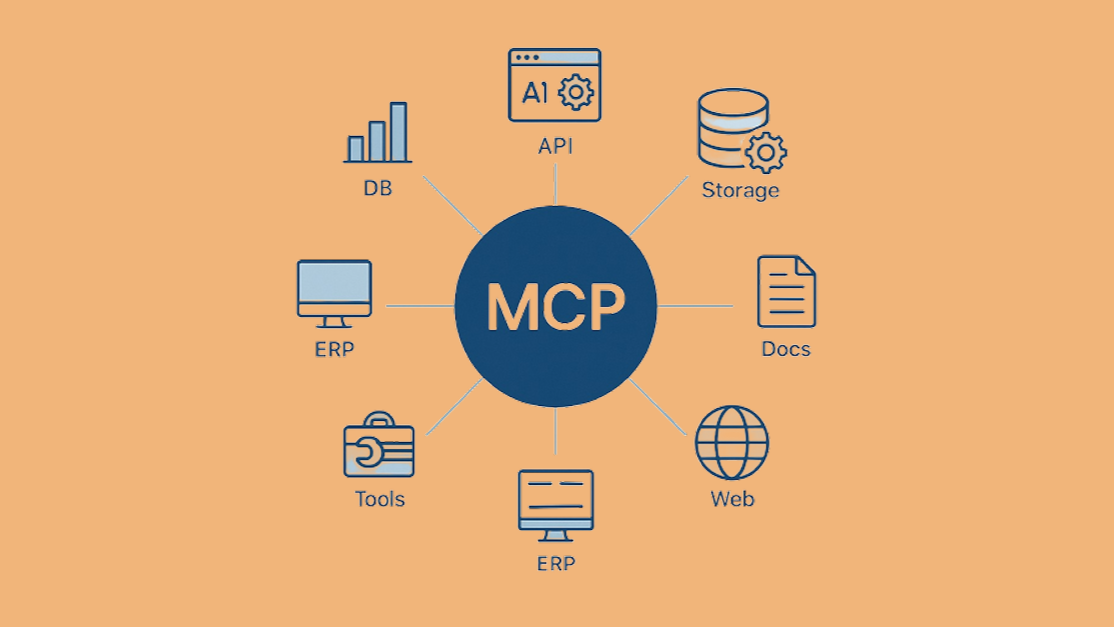
MCP stands for Model Context Protocol. It's an open standard that lets AI assistants securely connect to external data sources and tools — so your AI can work in the systems your business runs on, rather than in isolation.
How HubSpot MCP Works:
- Connects AI tools to HubSpot via MCP servers
- Uses OAuth-based permissioning
- Supports structured CRM queries
- Enables developer + non-developer use cases
HubSpot MCP vs Traditional HubSpot Integrations:
|
Feature |
HubSpot MCP |
Traditional API / Integrations |
|
Access method |
Natural language |
API calls / filters |
|
Setup complexity |
Low |
High |
|
AI compatibility |
Native |
Limited |
|
Permissions |
Scoped & auditable |
Custom-managed |
|
Speed to insight |
Instant |
Slower |
Here's something worth knowing before we go further: if you've already connected HubSpot to Claude or ChatGPT using their native connectors, you've already used MCP. You just didn't know that's what it was called. Those integrations — Claude's HubSpot connector, ChatGPT's plugins — are built on the MCP standard under the hood.
So why does it matter that HubSpot is building their own?
Native connectors are general — they give AI broad, shallow access. HubSpot MCP is purpose-built, scoped specifically to HubSpot's data model, auth system, and API structure. That means you get granular permission control, predictable query behavior, and access that's actually auditable. Think of it like the difference between a passkey that opens the front door and a keycard system that controls exactly which rooms you can enter.
HubSpot has built two distinct MCP servers, and most people don't realize they're separate products with different purposes:
|
Remote MCP Server |
Developer MCP Server |
|
|
Purpose |
Query CRM data via AI |
Build HubSpot apps with AI assistance |
|
Who it's for |
Marketers, sales ops, RevOps |
Developers building on HubSpot |
|
How it's accessed |
mcp.hubspot.com (cloud-based) |
hs mcp setup (local, runs in your IDE) |
|
Status |
Beta |
Available now |
The Remote HubSpot MCP Server — AI That Talks to Your CRM
The remote HubSpot MCP server lives at mcp.hubspot.com and is currently in beta. It lets AI assistants query your HubSpot CRM data using natural language — no API knowledge required.
It supports read-only access across a solid range of CRM objects: contacts, companies, deals, tickets, products, invoices, quotes, line items, and more. Authentication runs through OAuth with PKCE, meaning access is scoped to exactly what that user is already permitted to see in HubSpot.
Instead of spending 20 minutes building a filtered view or waiting on a report, you just ask: "Show me all open deals over $50k in the manufacturing segment." And you get an answer.
Key insight: This isn't a chatbot bolted onto HubSpot. It's a structured protocol — which means AI requests are predictable, permissions are enforced, and every interaction is auditable. For teams that care about data governance, that distinction matters a lot.
The Developer HubSpot MCP Server — Build HubSpot Apps Faster
The developer MCP server is a different tool for a different use case. It's a local install that runs inside your IDE — Claude Code, Cursor, VS Code, Windsurf, and more — and it gives your AI assistant HubSpot-specific context it simply wouldn't have otherwise.
You set it up with one command: hs mcp setup
From there, your AI knows the platform it's helping you build on. Here's what that unlocks:
- Scaffold new HubSpot projects and app features — generate new apps, cards, and configurations without starting from scratch
- Monitor builds and surface errors automatically — catch and fix issues inline without context-switching to docs
- Generate CMS content — modules, templates, serverless functions, page layouts
- Search HubSpot dev docs — without ever leaving your IDE
Personal insight: The biggest time savings I've seen are in two areas: scaffolding new project features and chasing down build errors.
Both of those used to mean flipping between my IDE, the HubSpot docs, and the CLI. Now it mostly just happens in-line. The difference between a generic AI coding tool and one that actually understands HubSpot's platform is hard to overstate once you've experienced it.
4 Reasons HubSpot MCP Changes the Game for CRM Teams
HubSpot MCP changes how CRM teams work—removing friction between data, AI, and execution.
Natural Language Replaces API Spelunking
CRM data has always been locked behind query logic — filters, API calls, report builders. HubSpot MCP makes that data conversational. No developer required for basic data retrieval, no custom report for every one-off question.
AI Dev Tools Finally Have HubSpot Context
Generic AI coding tools don't know HubSpot's schema, CLI conventions, or platform quirks. They guess — and often get it wrong. The developer MCP server fixes that. It's the difference between an AI that guesses at your platform and one that actually knows it.
No Custom Middleware Required
Connecting AI to CRM data used to mean building and maintaining custom integrations — auth layers, API wrappers, error handling, the works. HubSpot MCP handles the auth, the tooling, and the data access layer out of the box. The path from "I want AI to access my HubSpot data" to actually doing it is now a lot shorter.
Early Movers Have a Real Advantage
The remote MCP server is still in beta. The teams experimenting now — understanding the auth model, testing workflows, finding where it adds value — will be significantly ahead when it reaches general availability. The learning curve is low. The upside is high.
What to Keep in Mind (It's Still Beta)
Worth being upfront about the current limitations:
- Remote MCP is read-only for now — no write operations yet
- Scopes are auto-assigned at install — as HubSpot adds new tools to the server, users may need to reinstall the app to access them
- Built on CRM Search API — no vector or semantic search yet, so queries work best when they're reasonably structured
Rough edges exist — but none of them should stop you from exploring it now.
Is Your Team Ready to Connect AI to HubSpot?
HubSpot MCP isn't just a technical upgrade. It's a shift in how teams will interact with CRM data. Whether you're a marketer who wants answers without digging through reports, or a developer building on HubSpot's platform, this changes your workflow.
At Evenbound, we help teams get the most out of HubSpot — including the newer capabilities most teams haven't had a chance to explore yet. If you want to talk through how HubSpot MCP fits into your setup, we're happy to dig in. Click here to talk to our team.
Frequently Asked Questions
What is HubSpot MCP?
HubSpot MCP refers to HubSpot's implementation of the Model Context Protocol — an open standard that lets AI assistants securely connect to external data and tools. HubSpot has built two MCP servers: one for querying CRM data and one for developer tooling.
What's the difference between the remote and developer HubSpot MCP servers?
The remote MCP server (mcp.hubspot.com) connects AI to your HubSpot CRM data for natural language querying. The developer MCP server is a local install that gives AI assistants HubSpot-specific context for building apps and CMS content inside your IDE.
Is HubSpot MCP available to all HubSpot users?
The remote MCP server is currently in beta. Access may vary — check HubSpot's developer documentation for the latest on availability.
Do I need to be a developer to use HubSpot MCP?
Not necessarily. The remote MCP server is designed for anyone who wants to query CRM data using natural language — no technical background required. The developer MCP server is specifically for teams building on HubSpot's platform.
What CRM objects does the HubSpot MCP server support?
The remote MCP server currently supports read-only access to contacts, companies, deals, tickets, products, carts, orders, line items, invoices, quotes, and subscriptions.
Is HubSpot MCP free to use?
Creating an MCP auth app in HubSpot doesn't have a listed cost, but access may depend on your HubSpot plan and beta program status. Check HubSpot's developer docs for current information.