Why HubSpot Integrations Fail (And How Industrial Teams Can Fix Them)

|
Why do HubSpot integrations fail?
Most HubSpot integrations fail because teams don’t define their data model, data flow, reporting requirements, and system ownership before development. Without this foundation, integrations create inconsistent data, unreliable reporting, and low CRM adoption. |
Most HubSpot integrations don’t fail because of development. They fail because the system was never designed to work in the first place.
In simple terms: most HubSpot integrations fail because data, systems, and reporting aren’t defined before development starts.
For manufacturing and industrial companies, integrating HubSpot isn’t just about connecting tools. It’s about aligning your CRM, ERP, quoting systems, and operational data into a single, usable system.
And that’s where most teams go wrong.
They jump straight into development without defining how their data, systems, and reporting should actually work together.
This blog breaks down what causes most HubSpot integrations to fall short—and what needs to be in place before you build anything.
What Is a HubSpot Integration (Really)?
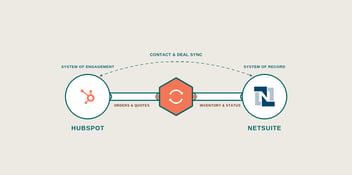
A HubSpot integration isn’t just an API (Application Programming Interface) connection between two systems.
It’s a structured way of defining:
- How your data is organized
- How it moves between systems
- How it’s used for reporting and decision-making
When done correctly, your integration becomes the foundation for your entire revenue system, not just a technical connection between tools.
It’s also important to understand how this differs from HubSpot onboarding or implementation.
Onboarding focuses on setting up HubSpot correctly. Implementation expands that to include workflows, pipelines, and internal processes.
An integration goes one step further—connecting HubSpot to the rest of your business systems (like ERP, quoting, or service platforms) and defining how data works across all of them.
What Systems Are Typically Involved in a HubSpot Integration?
Most HubSpot integrations connect HubSpot to other core business systems that manage operations, sales, and customer data.
These systems typically include:
ERP platforms (Enterprise Resource Planning)
Used to manage orders, invoices, inventory, and product data.
Common examples include NetSuite, SAP, Microsoft Dynamics, and Epicor.
This is often the most critical—and most complex—integration point for industrial companies.
CPQ and quoting tools
Used to generate quotes, configure products, and manage pricing logic.
These systems ensure sales teams can build accurate quotes while syncing deal data back into HubSpot.
Customer service and support platforms
Used to manage tickets, service requests, and customer interactions.
Integrating these systems allows HubSpot to reflect the full customer lifecycle—not just pre-sale activity.
Marketing automation and lead generation tools
While HubSpot often replaces these, many companies still integrate external platforms for events, paid media, or legacy systems.
Data warehouses and reporting systems
Used to centralize and analyze data across multiple platforms.
In more advanced environments, HubSpot integrates with a data warehouse to support revenue reporting, forecasting, and business intelligence.
Why Do Most HubSpot Integrations Fail?
Most integrations don’t fail during development. They fail before development even begins.
Most HubSpot integrations fail for four reasons:
- Data isn’t mapped before development starts
- The source of truth isn’t clearly defined
- Reporting requirements are treated as an afterthought
- HubSpot objects and relationships aren’t fully understood
These aren’t technical issues—they’re system design issues.
When they’re skipped, development doesn’t fix the problem—it amplifies it.
You don’t have an integration strategy until you have a data strategy.
What Actually Drives the Cost of HubSpot Integration?
When integrations are built without a clear foundation, they may still “work,” but the system quickly breaks down.
Common signs of a failing HubSpot integration include:
- Duplicate or conflicting records appear
- Data is written incorrectly between systems
- Reporting becomes unreliable or unusable
- Lifecycle stages and pipeline data become inconsistent
- Sales teams lose trust in the CRM
At that point, HubSpot stops functioning as a system of record and becomes something teams work around rather than rely on.
The 4 Things You Must Define Before a Successful HubSpot Integration
Before building any HubSpot integration, four critical decisions must be made.
1. Your Data Model
You need to define how your data is structured inside HubSpot.
That includes:
- Standard objects (contacts, companies, deals, tickets)
- Custom objects (equipment, service contracts, installations, etc.)
- How those objects relate to each other
If this isn’t defined upfront, data won’t map correctly, and reporting will break.
2. Data Flow Between Systems
You need to determine how data moves across your systems.
Key questions:
- Should data flow one way or both ways?
- Which system initiates updates?
- When should data sync (real-time vs scheduled)?
Without this clarity, systems will overwrite each other or fall out of sync.
3. Reporting Requirements
Reporting should not come last—it should come first.
What you need to report on determines how your data must be structured.
Examples:
- Pipeline forecasting
- Product-level revenue tracking
- Customer lifetime value
- Sales and marketing attribution
If reporting isn’t defined upfront, your integration may technically work, but it won’t produce usable insights.
4. Source of Truth (System Ownership)
Every piece of data must have a clearly defined owner.
For example:
- Contact data → HubSpot
- Product and order data → ERP
- Invoice data → ERP
Without this, systems compete—creating duplicate records, conflicting updates, and inconsistent reporting.
If you’re unsure how these pieces should fit together, it’s a sign your integration strategy isn’t fully defined yet.
👉 See What a Scalable Integration Actually Looks Like
When Do You Actually Need a Custom Integration?
Not every integration requires custom development—but many industrial environments do.
You likely need a custom integration if:
- You’re connecting HubSpot to an ERP system
- You have complex quoting or CPQ workflows
- You need bi-directional data sync
- You rely on operational data to support sales visibility
You may not need one if:
- A native HubSpot integration already fits your needs
- Middleware tools can handle the use case
- The problem is actually a process issue—not a system issue
Quick Breakdown:
|
Situation |
Do You Need a Custom Integration? |
|
ERP connection |
Yes |
|
Complex quoting workflows |
Yes |
|
Simple data sync |
No (middleware may work) |
|
Native integration exists |
No |
How Much Does a HubSpot Integration Cost?
The cost of a HubSpot integration varies widely depending on the complexity of your systems, data structure, and business requirements.
Most projects fall into three general ranges:
1. $2,000–$8,000 → Simple automation or middleware
This typically includes basic integrations using tools like Zapier or Make.
Best for:
- Simple, one-way data syncing
- Standard use cases with minimal customization
- Connecting a small number of systems
2. $10,000–$30,000 → API or private app integration
This level involves custom API connections or HubSpot private apps.
Best for:
- More complex data flows
- Multi-system integrations (e.g., HubSpot + quoting tools)
- Moderate customization and logic
3. $25,000–$50,000+ → Full custom integration
This includes fully custom-built integrations designed around your specific business systems.
Best for:
- ERP integrations (NetSuite, SAP, Microsoft Dynamics, etc.)
- Bi-directional data syncing
- Complex workflows, quoting logic, and operational data
- Long-term scalability and reporting accuracy
What Actually Drives the Cost of HubSpot Integration?
The biggest misconception is that integration cost is driven by development time.
In reality, cost is driven by:
- System complexity: How many platforms are involved, and how they interact
- Data structure: How clean, consistent, and defined your data model is
- Data flow requirements: One-way vs. bi-directional syncing
- Reporting needs: What insights you need the system to produce
- Customization level: Standard integration vs. tailored business logic
Key insight: A simple system with clear data can be inexpensive to integrate.
A complex system with undefined data will be expensive—regardless of how it’s built.
Why Does This Matter?
Two companies can spend the same amount on development and get completely different results.
The difference isn’t the code—it’s the system design behind it.
If your data model, data flow, and reporting requirements aren’t clearly defined upfront, your integration will likely require rework—driving up both cost and complexity.
Before You Build Anything, Ask Yourself This:
Before moving forward with a HubSpot integration, ask:
- Do we know where our data currently lives?
- Do we know how it should flow between systems?
- Do we know what we need to report on?
- Do we know which system owns each type of data?
If the answer to any of these is “no,” you’re not ready to build yet.
Want the Full Breakdown Before You Build?
If you’re evaluating a HubSpot integration, the biggest risk isn’t choosing the wrong tool—it’s building on the wrong foundation.
We put together a full guide that walks through:
- Integration architecture that actually scales
- Data hub vs. point-to-point integration models
- Real-world scenarios (ERP, quoting, service systems)
- A complete readiness checklist
Avoid costly rework and misaligned systems by getting this right the first time.
If you want a clearer picture of what a scalable integration actually looks like, this is the next step:
FAQs About HubSpot Integrations
What is a HubSpot integration?
A HubSpot integration is a structured connection between HubSpot and other business systems—such as ERP, quoting, or service platforms—that defines how data is organized, shared, and used across your organization.
Why do most HubSpot integrations fail?
Most HubSpot integrations fail because data structure, reporting requirements, and system ownership aren’t defined before development begins. Without that foundation, integrations produce inconsistent data and unreliable reporting—even if they technically “work.”
How much does a HubSpot integration cost?
The cost of most HubSpot integrations ranges from:
- $2,000–$8,000 for simple middleware or automation
- $10,000–$30,000 for API or private app integrations
- $25,000–$50,000+ for full custom integrations
Cost is driven by data complexity, system architecture, and workflow requirements—not just development time.
How long does a HubSpot integration take?
HubSpot integration timelines vary by complexity, but most take anywhere from a few weeks to several months. Projects involving ERP systems, multiple platforms, or complex data structures typically require more planning and testing.
Do I need a custom integration or middleware?
Middleware works well for simple use cases with straightforward data flows. However, if you’re working with ERP systems, complex quoting workflows, or bi-directional data syncing, a custom integration is usually required.
What systems can HubSpot integrate with?
HubSpot can integrate with a wide range of systems, including:
- ERP platforms
- Quoting and CPQ tools
- Customer service platforms
- E-commerce systems
- Marketing and automation tools
The right integration approach depends on how your data and workflows are structured.
When should you not build a custom HubSpot integration?
You may not need a custom HubSpot integration if:
- A native HubSpot integration already meets your needs
- Middleware tools can handle the use case
- The issue is process-related, not system-related
In some cases, a data warehouse or reporting layer is a better solution than syncing systems directly.
What should be defined before building a HubSpot integration?
Before building an integration, you should clearly define:
- Your data model (how data is structured)
- Data flow between systems
- Reporting requirements
- Source of truth for each data type
Without these, your integration is likely to fail or require costly rework later.