
Most website projects don't fail because of design or development talent; they fail because of how the project is managed.
Timelines slip. Scope creeps. Stakeholders go quiet for two weeks and then resurface with a long list of new requests. Launches get rushed to hit a date that was never realistic to begin with. This is a timeline and budget problem, and it's predictable, repeatable, and avoidable.
The stakes are real too. Teams that keep a website project on time and on budget are twice as likely to say most of their revenue comes from that website, according to recent web design research. Managing the process well is directly tied to whether the site performs.
A website is an operational deliverable. It has dependencies, stakeholders, approval chains, and technical constraints, just like any industrial project. When it's managed like a loose creative process instead of a structured build, things break.
Why Does Website Project Management Break Down in B2B Companies?
Most B2B companies apply less process discipline to their website than they do anywhere else in the business.
Marketing teams are often given ownership of the website without being given ownership of the process discipline that keeps a project on track. That's a mismatch. Industrial and manufacturing companies, in particular, are used to rigorous project management on the plant floor: documented processes, clear accountability, defined checkpoints. That same rigor rarely gets applied to digital projects, even though a website has just as many moving parts and dependencies.
The result is that website work gets treated as marketing's side project instead of what it actually is: a cross-functional initiative with risk, budget, real consequences if it goes sideways. It's the same discipline behind Evenbound's Industrial Growth System, which brings that plant-floor rigor into how we run marketing and web projects for B2B and industrial companies.
What Are the Most Common Website Project Management Mistakes?
The most common mistakes are undefined ownership, scope creep, late content, unstructured feedback, late technical discovery, unrealistic timelines, and no launch plan. Each one is avoidable with a small amount of upfront structure.
Here's what each one actually looks like in practice, and what fixes it.
1. No Single Point of Ownership
Multiple stakeholders weigh in, but no one has the final say. Decisions stall while everyone waits to hear from "whoever's free," and small choices turn into multi-week delays because nobody is empowered to just make the call.
The fix: Name one owner and one sign-off authority, and document it before the project starts. Everyone involved should know exactly who has final say on scope, design, and content decisions.
2. Scope Isn't Defined Before Work Starts
"We'll figure out pages as we go" feels flexible in the moment, but it's one of the fastest ways to blow a timeline. New pages, new sections, and new "just one more thing" requests keep showing up mid-project because nothing was locked down at the start.
The fix: Lock the sitemap, content requirements, and core functionality before design work begins. If you're not sure what a well-scoped website design and development project looks like from the outset, that's exactly the kind of groundwork worth getting right before kickoff.
3. Content Is an Afterthought
Design and development move forward while content lags behind, or content gets written and then has to be awkwardly forced into a template it was never built for. Either way, something ends up rushed.
The fix: Treat content as its own workstream with its own deadlines, not a last-minute fill-in. But there's a nuance here worth calling out directly, because it's one of the most common questions we hear.
Does content come first, or does design come first?
There's no universal right answer. The best sequence depends on what's driving your project.
Content-first tends to work better when messaging is still evolving, when you want design to visually support a clear narrative rather than the other way around, or when stakeholders tend to fixate on visuals early and lose sight of substance. Starting with content forces clarity before anyone touches a wireframe.
Design-first tends to work better when the site has complex functionality or layout requirements that content has to be written to, such as structured product specs or technical documentation. It also makes sense when brand or UX is the primary driver and content will be adapted to fit established modules, or when the team already has strong messaging and just needs a framework to place it in.
| Content-first | Design-first |
|
|
In practice, a hybrid approach often works best: rough content direction, headlines, key messages, and structure locked in early, with wireframes built in parallel, and full copy finalized once the layout confirms how much space you actually have to work with.
4. Feedback Rounds Aren't Structured
Open-ended "let us know what you think" review requests invite scattered, conflicting input from everyone who happens to see the email. Without structure, feedback rounds drag on indefinitely.
The fix: Build structured feedback windows tied to specific questions and specific deliverables, so reviewers know exactly what they're evaluating and when their input is due.
5. Technical Requirements Get Discovered Too Late
Integrations, CRM needs, or hosting constraints surface in week eight instead of week one, forcing the team to rework already-built pages or scramble to accommodate a requirement that should have shaped the plan from the start.
The fix: Run technical discovery in week one, not week eight. This is especially true for teams building on HubSpot, where HubSpot Technical Services can help identify integration and CRM requirements before design work locks anything in.
6. Timelines Are Aspirational, Not Realistic
Deadlines get set to satisfy a launch event, a trade show, or an executive's expectations, rather than the actual scope of work. The date comes first, and the plan gets forced to fit around it.
The fix: Build the timeline from the work back. Start with the real scope of work, map out how long each phase honestly takes, and let the launch date fall out of that math, not the other way around.
7. No Plan for Launch or Post-Launch
The site goes live with no QA checklist, no redirect plan, and no clear ownership of what happens after launch day. Broken links, lost SEO equity, and unnoticed bugs are the usual result.
The fix: Treat launch as its own phase with its own checklist, not the finish line of the project.
None of these seven mistakes are signs of a bad team. They're signs of a website project management process that was never built to catch them.
Not sure where your last website project went sideways? Talk to our team about what a structured build looks like →
What Does Strong Website Project Management Look Like?
Strong website project management looks like an industrial project: scoped, sequenced, and clearly owned, with every phase tied to a defined output and deadline instead of a calendar guess.
Every phase has a defined output, a named owner, and a deadline tied to real dependencies, not a date picked because it sounded reasonable. This is the same operating logic behind Evenbound's Industrial Growth System: strategy, people, and process come before technology, not after.
The manufacturers who run the tightest operations are often surprised by how loose their website process has been by comparison, and how much smoother it runs once it's managed with the same discipline.
What Happens When the Process Works
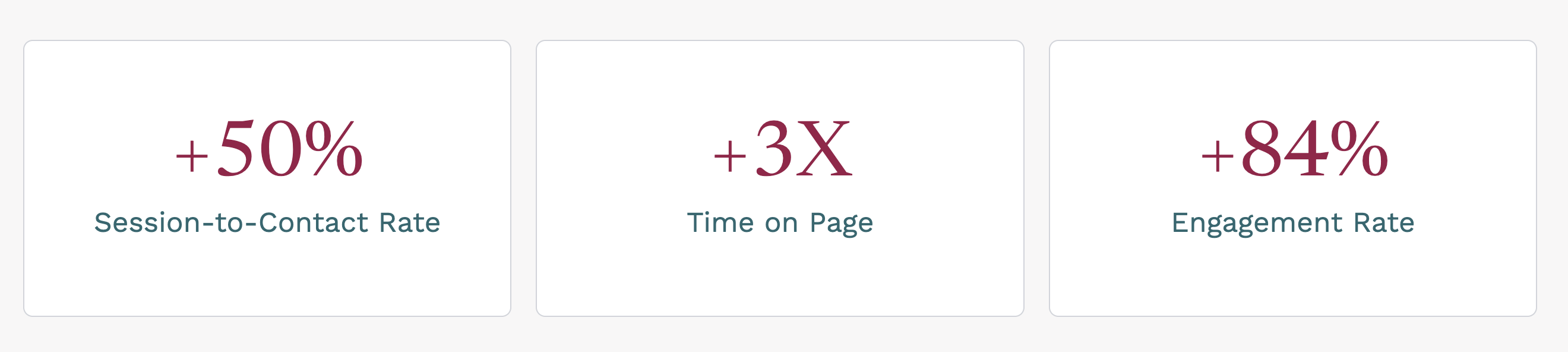
A Houston-based cybersecurity firm came to Evenbound for a WordPress-to-HubSpot migration weighed down by an outdated brand, a sluggish site, and messaging that was still in flux. With a structured migration, clear scope, modular design, and a managed content overhaul, the results included a 50%lift in session-to-contact rate, three times the time on page, and an 84%increase in engagement.
Considering a migration to HubSpot CMS? Here's a helpful checklist.
What Tools Are Best for Managing a Website Project?
There's no single best tool. The right one depends on your team size, whether you need client or stakeholder visibility, and how tightly the tool needs to integrate with your CMS or CRM. Most general-purpose project management tools work fine for website projects, but a few features matter more for web builds specifically than for other project types.
People searching "website project management" are often looking for a tool, not a strategy, and that's worth addressing directly rather than ignoring. The tool matters less than the process running underneath it, but the right tool makes a good process easier to enforce, and the wrong one makes a bad process feel invisible until launch week.
For website projects specifically, look for visual or kanban views for tracking page-by-page or section-by-section progress, client-facing views for structured feedback (which ties directly back to mistake #4 above), and native or easy integration with your CMS or CRM, so launch tasks don't live in a separate system from the site itself.
| Tool | Best For | Website-Specific Strength | Watch-Outs |
| Asana | Teams that want structure without heavy overhead | Strong task dependencies, good for sequencing content, design, and dev work | Can get cluttered on larger, multi-stakeholder brands |
| ClickUp | Teams that want one tool to do everything | Highly customizable views (list, board, Gantt) for different phases of a build | Flexibility can become complexity if not configured carefully |
| Monday.com | Marketing teams that want visual, color-coded tracking | Easy for non-technical stakeholders to follow at a glance | Less robust for deep technical or dev task tracking |
| Notion | Smaller teams or projects needing docs and tasks in one place | Great for combining content drafts, sitemaps, and approvals in one workspace | Less purpose-built for hard deadlines and dependencies at scale |
| Teamwork | Agencies managing multiple client website projects at once | Built specifically for client-facing project delivery | Steeper learning curve than lighter tools |
| HubSpot (Content Hub) | Teams already running marketing and sales on HubSpot | Keeps website tasks connected to the CMS itself, so there's no handoff gap at launch | Not a full project management tool on its own; works best paired with one of the tools above |
If you're already on HubSpot, HubSpot Technical Services can help make sure your CMS and your project workflow are actually talking to each other.
Already have a tool but still running into these problems? Let's talk. It's usually a process gap, not a tool gap.
Are You Ready to Rethink Your Website Project Management Process?
At Evenbound, we bring the same operational rigor from our Industrial Growth System to every website design and development engagement: clear ownership, defined scope, structured feedback, and a plan for launch and beyond.
If your last website project felt overwhelming, or you're about to start one and want to avoid the usual pitfalls, we're happy to talk through what a well-managed process actually looks like.