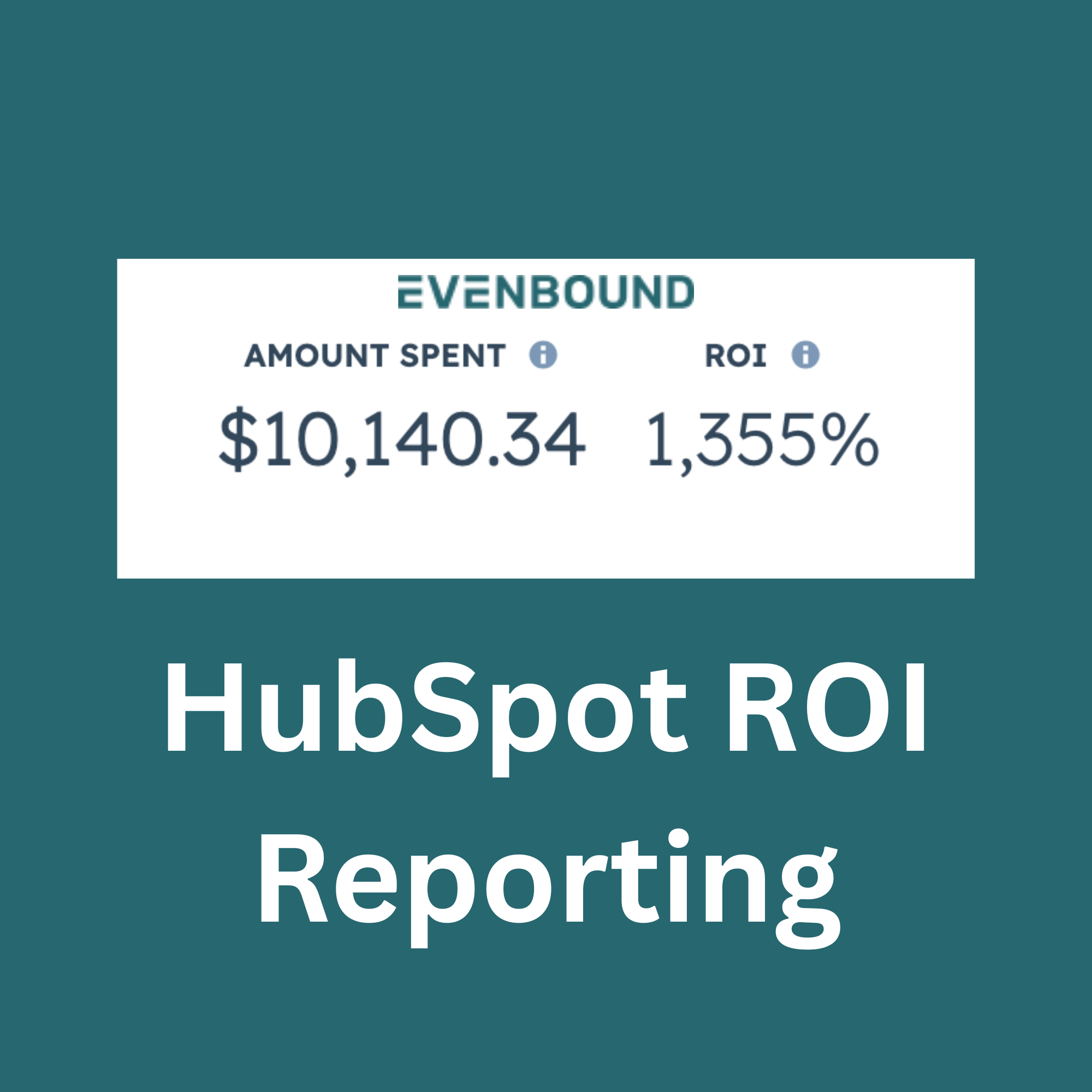
For B2B industrial marketing leaders, proving ROI isn’t just difficult—it’s fragmented. Data lives across platforms, attribution is unclear, and connecting spend to revenue often feels like guesswork.
You might know how many leads you generated or how much you spent, but tying that directly to revenue across campaigns? That’s where things break down.
This is where HubSpot reporting becomes a powerful advantage. It centralizes marketing, sales, and revenue data into a single system, making it possible to track performance from first interaction through closed deals.
Quick Answer: What Is a HubSpot ROI Report?A HubSpot ROI report measures how much revenue your marketing and sales efforts generate compared to what you spend. It connects ad spend, campaigns, contacts, and deals inside HubSpot’s CRM to show true return on investment, using both built-in dashboards for short-term insights and custom reports for long-term performance tracking. |
Why Does HubSpot Reporting Matter for B2B Industrial ROI?
For B2B Industrial marketing leaders, proving ROI isn’t just difficult—it’s fragmented. Data lives across platforms, attribution is unclear, and connecting spend to revenue often feels like guesswork. You might know how many leads you generated or how much you spent, but tying that directly to revenue across campaigns? That’s where things break down in complicated, long-term sales cycles.
This is where HubSpot reporting becomes a powerful advantage.
HubSpot centralizes marketing, sales, and revenue data into a single system, making it possible to track performance from first interaction all the way through closed deals. But not all reporting in HubSpot is created equal.
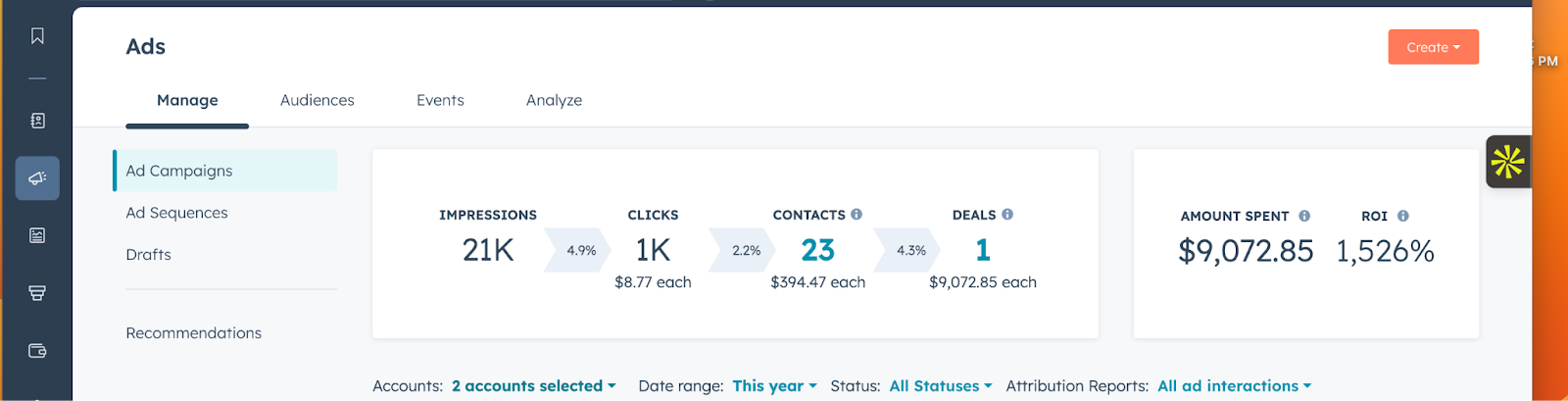
On one side, you have built-in reporting tools, such as the Ads Dashboard, that provide fast, accessible insights into campaign performance and ROI.
On the other, you have custom dashboards and reports, which unlock deeper, long-term analysis and strategic visibility.
The reporting ecosystem snapshot:
- HubSpot’s Ads Dashboard makes it incredibly easy to calculate ROI over a single chunk of time and at the campaign level
- But if you want to understand trends over time or make strategic campaign improvements based on large datasets, use custom reporting.
- Combining both reporting styles is best for shareholder reports, balancing the simple, quick wins with long-term data and trends.
Understanding how—and when—to use each is the key to getting the most out of HubSpot reporting.
Understanding Complicated ROI in HubSpot Reporting
At its core, ROI in HubSpot reporting comes down to a simple equation:
Revenue generated vs. spend over time
But in practice, measuring ROI is more nuanced. HubSpot allows you to tie revenue directly to marketing efforts using CRM data, which means you’re not just tracking clicks or conversions—you’re tracking actual business outcomes over long periods of time and multiple data points and touchpoints. Understanding what matters allows for better reporting, insights, and ultimately growth.
Key Metrics That Define ROI in HubSpot
To understand ROI effectively, you need to look at a combination of metrics:
- Cost per contact – How much you’re spending to generate leads
- Cost per customer – The true acquisition cost
- Revenue attributed to campaigns – The ultimate measure of performance
These metrics become meaningful when paired with attribution models, which can change metrics over a period of time, especially with complicated and longer sales cycles.
Why Attribution Matters
Attribution determines how credit is assigned to different touchpoints in a customer journey. Without it, ROI reporting becomes misleading.
For example:
- Did a customer convert because of the first ad they clicked?
- Or was it the final interaction that pushed them over the edge?
HubSpot reporting answers these questions through different attribution models—and this is where the platform shines, particularly in its built-in Ads Dashboard.
HubSpot’s Built-in Ads Dashboard: Fast ROI Insights
Overview of the Ads Dashboard
HubSpot’s Ads Dashboard is one of the most accessible and powerful out-of-the-box reporting tools available in the platform.
It integrates directly with major advertising platforms, including:
- Google Ads
- Facebook/Instagram
Once connected, data flows automatically into HubSpot. No manual imports. No spreadsheets. Just real-time visibility into performance.
This native integration is what enables HubSpot reporting to connect ad spend directly to CRM outcomes like contacts, deals, and revenue.
ROI Tracking Capabilities
The Ads Dashboard makes ROI tracking straightforward.
You can quickly see:
- Ad spend vs. revenue generated
- Contacts created from campaigns
- Deals influenced by ads
- Customers acquired
This is where HubSpot reporting stands out—because it doesn’t stop at top-of-funnel metrics. It follows the entire lifecycle.
Instead of asking:
“How many clicks did this campaign get?”
You can ask:
“How much revenue did this campaign generate?”
That shift is critical for ROI-focused organizations, allowing you to draw conclusions between campaigns bringing in contacts first and then those campaigns that close deals.
Attribution Models Available
Within the Ads Dashboard, HubSpot provides two primary attribution models:
First Touch Attribution
- Assigns 100% of the credit to the first interaction
- Helps identify which campaigns are driving initial awareness
- Best for understanding top-of-funnel performance
All Ad Interactions Attribution
- Distributes credit across every ad interaction in the journey
- Reflects the reality of multi-touch buying behavior
- Useful for evaluating overall campaign influence
These models allow marketers to quickly evaluate performance from different perspectives—without needing to build anything manually.
Key Strengths of the Ads Dashboard
The biggest advantage of the built-in Ads Dashboard is speed.
- No setup required
- Real-time performance tracking
- Campaign-level ROI visibility
It’s ideal for:
- Paid media managers optimizing campaigns
- Weekly or monthly reporting cycles, how the current time period is performing
- Quick performance checks and adjustments
If your goal is to understand what’s happening right now, HubSpot’s built-in reporting delivers.
Limitations of HubSpot’s Built-in Reporting
As powerful as the Ads Dashboard is, it has clear limitations—especially when you zoom out.
Lack of Long-Term Time Series Data
The biggest gap? Time.
The Ads Dashboard is not designed for long-term trend analysis. You won’t get:
- Clear quarterly comparisons
- Year-over-year performance insights
- Visualizations of growth over time
This makes it difficult to answer questions like:
- “How did Q1 compare to Q4?”
- “Are we improving efficiency year over year?”
Limited Customization
Built-in reporting is intentionally simplified.
But that simplicity comes at a cost:
- Fixed views
- Limited ability to customize metrics
- Minimal flexibility in combining data sources
You can’t easily:
- Blend lifecycle stage data with revenue trends
- Create complex multi-object reports
- Tailor dashboards for different stakeholders
Attribution Constraints
The Ads Dashboard works best when reporting:
- First touch
- All ad interactions
The Strategic Gap
Ultimately, built-in HubSpot reporting answers one question extremely well:
“What’s happening right now?” or “What has happened in a single chunk of time?”
But it struggles to answer:
- “What trends are shaping performance over time?”
- “How did we perform compared to last year?”
- “What should we change strategically?”
For those answers, you need to go beyond built-in tools and rely more on custom reports. Custom reports will help better identify changes and what caused them. This delta variable helps us identify opportunities to scale.
Custom Dashboards in HubSpot Reporting: The Bigger Picture
What Custom Reporting Unlocks
HubSpot’s custom report builder opens up a completely different level of insight.
With custom reporting, you can:
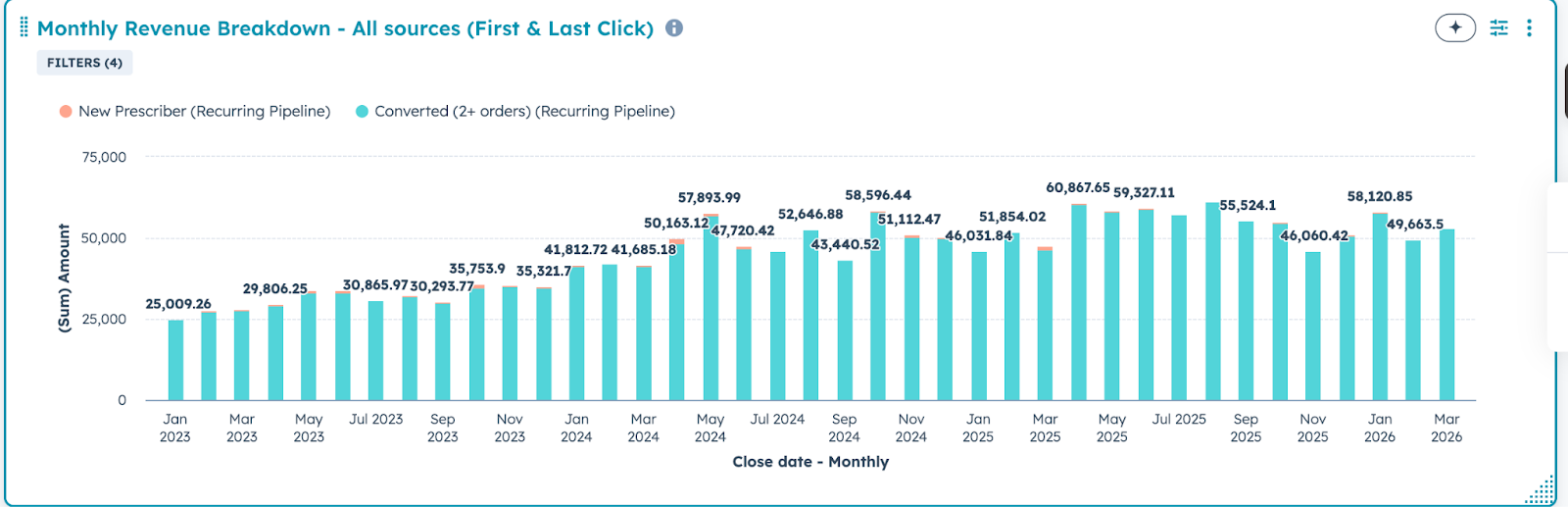
- Build time series reports
- Combine multiple data sources (contacts, deals, revenue)
- Create multi-object reports tied to lifecycle stages and performance
This is where HubSpot reporting shifts from tactical to strategic.
Time Series Reporting for ROI
Custom dashboards allow you to track performance over time:
- Monthly
- Quarterly
- Yearly
This enables you to identify:
- Trends in performance
- Seasonal patterns
- Campaign longevity
Instead of seeing a snapshot, you see the full story.
For example:
- Are acquisition costs increasing over time?
- Are certain campaigns driving long-term revenue?
These insights are impossible to get from built-in dashboards alone.
Custom Attribution Models
Custom reporting relies on two main attribution models that, when paired, provide a holistic picture of revenue over time. When separate, they hone in on individual trends that can be cross-referenced with the built-in dashboard to draw strategic conclusions.
First Touch Attribution
- Still valuable for understanding lead generation
- Helps identify which channels drive awareness
Last Touch Attribution
- Critical for revenue analysis
- Shows what actually converted leads into customers
This dual perspective is essential:
- First touch tells you where growth starts
- Last touch tells you where revenue happens
Together, they create a more complete picture of ROI. For example, if we know that we launched a new non-branded search campaign in Q1 and saw the last month of first-touch revenue increase significantly, we can draw a safe conclusion that this campaign is a new driver.
When we balance these high-level trends with the built-in campaign-specific reporting, individual campaign tweaks lead to account-level improvements.
Visualization & Executive Reporting
Custom dashboards are also where HubSpot reporting becomes presentation-ready.
You can build dashboards tailored for:
- Marketing teams
- Sales leadership
- Executive stakeholders
These dashboards can combine:
- Revenue data
- Deal counts and stages
- Lifecycle stage progression
- Attribution types (both first and last touch)
The result?
Clear revenue metrics that support better decision-making at every level.
Built-in vs. Custom HubSpot Reporting: Key Differences
Side-by-Side Comparison
Built-in Ads Dashboard
- Best for: Campaign-level ROI
- Attribution: First touch, all ad interactions
- Timeframe: Short-term
- Ease of use: High
Custom Dashboards
- Best for: Strategic ROI analysis
- Attribution: First touch, last touch
- Timeframe: Long-term (time series)
- Flexibility: High
When to Use Each
Use Built-in Reporting When:
- Monitoring weekly performance
- Optimizing active campaigns
- Making quick tactical decisions
Use Custom Reporting When:
- Conducting quarterly or yearly reviews
- Planning budgets
- Reporting to leadership
- Identifying long-term trends
The most effective teams don’t choose one—they use both together.
Best Practices for HubSpot Reporting on ROI
To get the most out of HubSpot reporting, it’s important to combine tools and align them with your goals.
1. Use Both Reporting Approaches Together
- Ads Dashboard for tactical insights
- Custom dashboards for strategic analysis
2. Align Reporting with Decision-Making
- Weekly: Campaign optimization (built-in)
- Monthly/Quarterly: Performance reviews (custom)
3. Match Attribution to Your Goals
- First touch → Awareness and lead generation, new revenue generated
- Last touch → Revenue and conversions, lifetime revenue value
4. Build a Consistent Reporting Cadence
- Avoid ad-hoc reporting
- Standardize dashboards across teams
When done correctly, HubSpot reporting allows you to build a system for consistent revenue growth.
How to Create a HubSpot ROI Report (Step-by-Step)
If you want accurate ROI reporting in HubSpot, follow this process:
- Connect your ad platforms
Integrate Google Ads, LinkedIn, and other channels. - Clean up your CRM data
Ensure lifecycle stages and deal tracking are accurate. - Set up attribution models
Use first touch and last touch to understand performance. - Use the Ads Dashboard for quick insights
Monitor campaign-level ROI. - Build custom reports for long-term analysis
Track trends, revenue, and efficiency over time. - Create dashboards for stakeholders
Align marketing, sales, and leadership around the same data.
Common Mistakes to Avoid With HubSpot Reporting
Even with powerful tools, ROI reporting can go wrong. Here are the most common pitfalls:
- Relying only on built-in dashboards
→ Limits visibility into long-term performance - Ignoring attribution differences
→ Leads to misleading conclusions about ROI - Not tracking long-term trends
→ Prevents strategic decision-making - Misinterpreting ROI due to incomplete data
→ Results in poor budget allocation
Avoiding these mistakes is just as important as building the reports themselves.
Building a Smarter HubSpot Reporting Strategy
HubSpot reporting offers a powerful way to connect marketing efforts directly to revenue, but only if you use it correctly.
Built-in dashboards provide:
- Speed
- Simplicity
- Real-time campaign insights
Custom reporting delivers:
- Depth
- Flexibility
- Long-term, strategic visibility
The key takeaway?
True ROI visibility requires both.
When you combine fast, tactical insights with deeper, time-based analysis, you gain a complete understanding of performance—one that fuels smarter decisions, better budget allocation, and sustainable growth.
Ready to talk growth and set up better HubSpot Reporting? Contact Evenbound.