
If your HubSpot deal stages are just labels on a board, you’re leaving revenue visibility on the table.
Deal stages aren’t just a sales admin task. They directly impact:
- Forecast accuracy
- Pipeline health reporting
- Sales velocity
- Revenue predictability
- Cross-team alignment
When set up correctly, HubSpot deal stages are among the most powerful levers in your CRM.
If you’re searching for how to change deal stages in HubSpot, the steps are simple — but optimizing them for revenue takes strategy.
Let’s break down what they are, how to change them in today’s HubSpot UI, and how to optimize them for serious revenue performance.
How do HubSpot Deal Stages Help Streamline Sales?
HubSpot deal stages are predefined steps in your sales pipeline that track a deal’s progress from opportunity to closed won or lost. Each stage represents a measurable revenue milestone and includes a probability that impacts forecasting and reporting.
Each stage should answer one clear question:
What must be true for a deal to move forward?
Deal stages are not:
- Vague activity markers
- Sales rep memory aids
- “Best guess” placeholders
Deal stages are structured revenue checkpoints.
In HubSpot, each deal stage:
- Has a defined name
- Has a required probability
- Impacts forecasting
- Drives pipeline reporting
- Can trigger automation
When structured correctly, your deal stages create clarity across marketing, sales, and leadership.
HubSpot Deal Stages: At a Glance
- Define measurable revenue milestones
- Drive weighted forecasting
- Enable stage-based automation
- Improve pipeline reporting
- Align marketing, sales, and RevOps
Why HubSpot Deal Stages Matter More Than Ever Right Now
Modern revenue teams expect more from their CRM.
For industrial and manufacturing companies with long sales cycles and ERP integrations, poorly structured deal stages distort revenue projections and hide operational bottlenecks.
Your deal stages directly affect:
1. Forecast Accuracy
If probabilities don’t reflect reality, your forecast will be inflated or unreliable.
2. Pipeline Health
Clear stage definitions help you see:
- Where deals stall
- Where deals consistently fall out
- Which stages have bloated aging times
3. RevOps Alignment
Deal stages define:
- Sales handoffs
- Required fields
- Automation triggers
- Reporting logic
Poorly defined stages create messy data. Clean stages create operational clarity.
How to Change Deal Stages in HubSpot (Step-by-Step)
If you’re wondering, “How do I edit deal stages in HubSpot?” — here’s the current process:
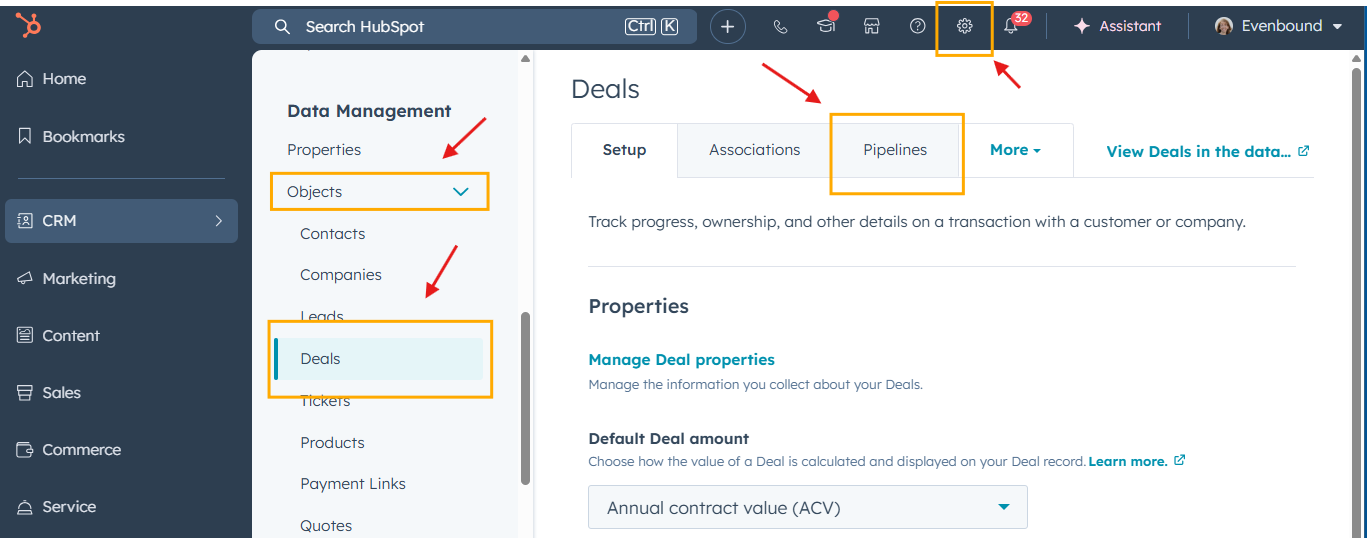
Step 1: Navigate to Your Pipeline
Go to:
Settings → Objects → Deals → Pipelines
(Previously under Sales → Deals → Board actions — this has changed in recent versions.)
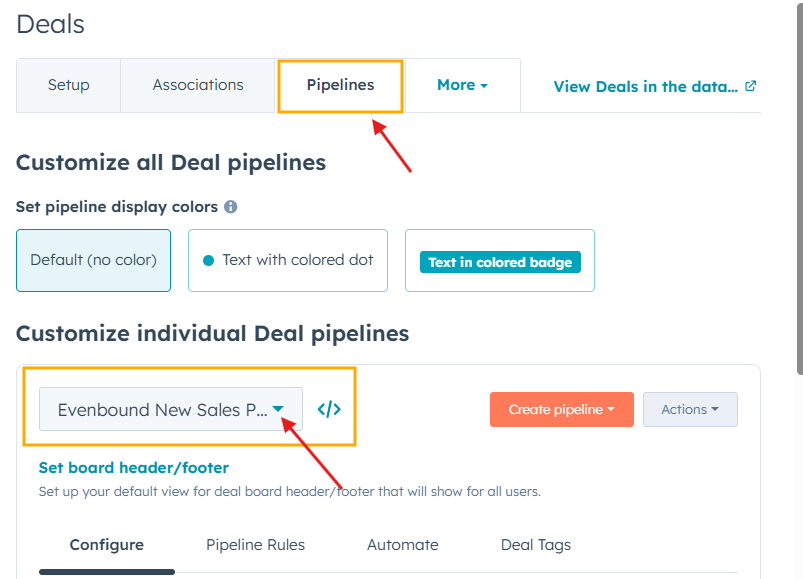
Step 2: Select the Pipeline You Want to Edit
Professional and Enterprise accounts may have multiple pipelines.
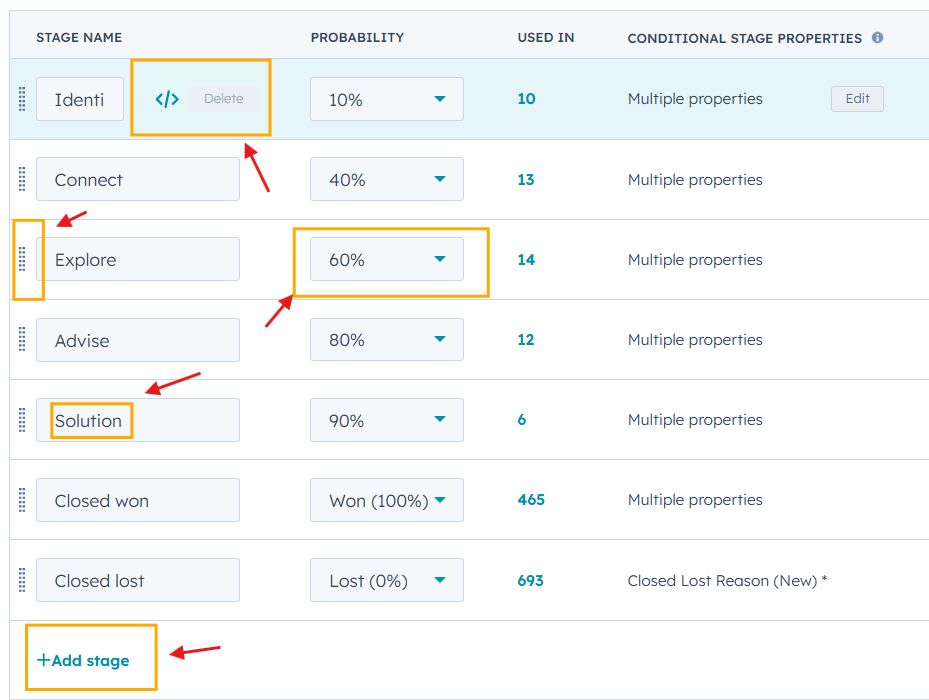
Step 3: Edit Stages
From here you can:
- Rename stages
- Add new stages
- Delete stages
- Reorder stages
- Adjust stage probability
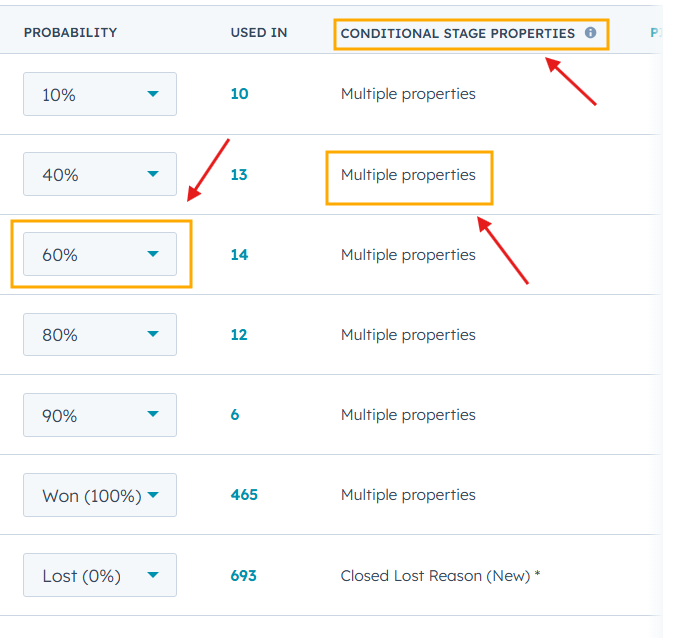
Step 4: Set Stage Properties
For revenue clarity, you should:
- Define exit criteria; known as Conditional Stage Properties
- Add required properties
- Align probability with historical close rates
- How to change deal stage probability in HubSpot:
- Go to Settings → Objects → Deals → Pipelines
- Click the stage you want to edit
- Adjust the probability percentage
- Click Save
Note: Updating probability will immediately affect weighted forecasting.
What Deal Stages Should You Use?
HubSpot provides the following default deal stages:
- Appointment Scheduled (20%)
- Qualified to Buy (40%)
- Presentation Scheduled (60%)
- Decision Maker Bought-In (80%)
- Contract Sent (90%)
- Closed Won (100%)
- Closed Lost (0%)
These are a starting point — not a strategy.
For industrial and manufacturing teams, we often recommend aligning stages to actual buying behavior, not sales activities.
Example Deal Stage Structures by Industry
Manufacturing Sales Pipeline Example:
- New Opportunity (10%)
- Technical Qualification (25%)
- Needs Assessment Completed (40%)
- Initial Quote Delivered (55%)
- Engineering Review (70%)
- Final Quote Submitted (85%)
- Closed Won (100%)
- Closed Lost (0%)
Notice these are buyer-driven milestones, not rep-driven activities.
Construction Sales Pipeline Example:
- New Opportunity (10%)
- Qualified to Bid (25%)
- Site Visit Completed (40%)
- Design Proposal Delivered (60%)
- Estimate Approved (80%)
- Contract Signed (100%)
- Closed Lost (0%)
Again — clear progression, clear revenue signals.
How to Optimize Deal Stages for Forecasting Accuracy
Most teams get this wrong. Deal stages must be optimized for forecasting accuracy — not just pipeline organization.
Here’s what revenue-optimized deal stages require:
1. Clear Exit Criteria
Every stage should have documented rules:
- What must be completed?
- What documentation exists?
- Who approved the advancement?
If it’s subjective, it’s unreliable.
2. Probability Based on Historical Data
Do not use “default” probabilities forever.
Instead:
- Pull 12 months of deal data
- Calculate actual close rates by stage
- Adjust probabilities to match reality
Your CFO will thank you.
3. Required Fields at Key Stages
Examples of required fields at critical stages include:
- Budget confirmed
- Decision maker identified
- ERP integration requirements documented
- Target implementation timeline
These prevent premature advancement.
4. Stage Aging Monitoring
Track the age of contacts in each stage:
- Average days per stage
- Deals stuck beyond the benchmark
- Pipeline bloat
Healthy pipelines move. Bloated pipelines hide risk.
Common HubSpot Deal Stage Mistakes
There’s an array of mistakes you can make when it comes to HubSpot deal stages. We see these constantly in industrial teams:
- Too many stages (overcomplication)
- Activity-based stages (“Left Voicemail”)
- No clear definitions
- Probability disconnected from reality
- Sales bypassing stages entirely
- Marketing is unable to report true revenue attribution
If your pipeline feels messy, it’s usually a stage structure issue.
How HubSpot Deal Stages Connect to RevOps
Deal stages impact more than sales.
They influence:
- Marketing attribution reporting
- Revenue dashboards
- Lifecycle stage automation
- Sales commission reporting
- Customer onboarding triggers
When deal stages are misaligned, everything downstream breaks.
When they’re aligned, forecasting becomes predictable.
When to Create Multiple Pipelines in Your CRM
You should consider creating separate pipelines for a few reasons, including when:
- Sales cycles differ significantly
- Product lines have different close rates
- Enterprise deals move differently from SMB (Small and Midsize Business)
- Channel sales require unique tracking
Avoid forcing completely different motions into one pipeline.