HubSpot AI tools (collectively called Breeze) are built directly into the CRM and cover content creation, prospecting, customer support, data enrichment, and workflow automation. For B2B teams, the HubSpot AI tools that drive results are the ones paired with clean data, defined processes, and connected systems.
Without that foundation, the same tools produce inconsistent output or automate problems that already exist. This is actually useful information if your team is willing to act on it.
B2B sales, marketing, and service have always carried more complexity than simple tools were built for, from long sales cycles to multiple decision-makers and technical products that require lots of information. Sales handoffs break down when systems don’t talk to each other. HubSpot AI doesn’t erase those challenges, but when it’s deployed effectively, it reduces the manual work that gets in the way of addressing them and surfaces the data that helps teams make better decisions faster.
This article covers what HubSpot AI tools are available, how each tool connects to real business outcomes, where things can break down, and how to activate them in your HubSpot portal.
What AI Tools Are Available in HubSpot?
HubSpot’s AI tools all live under one suite called Breeze, which has three main components: Breeze Copilot, Breeze Agents, and Breeze Intelligence.
|
Breeze is HubSpot’s unified AI layer — not a standalone app or add-on, but a set of capabilities woven throughout Marketing Hub, Sales Hub, Service Hub, and the Smart CRM. |
Each Breeze component handles a different kind of work:
- Breeze Assistant/Copilot: An embedded AI assistant that helps users write, summarize, prep for meetings, and take action inside HubSpot without leaving the platform.
- Breeze Agents: Specialized AI tools that execute work autonomously. Each agent is built for a specific function: content, prospecting, customer support, or data management.
- Breeze Intelligence: The data layer. It enriches CRM records from a network of 200M+ buyer and company profiles, surfaces buyer intent signals, and auto-shortens forms for returning visitors.
HubSpot Breeze AI Tools Comparison
Here’s a full breakdown of the tools available under the HubSpot Breeze umbrella, what each one does, and where it fits in a B2B workflow.
|
Breeze AI Tool |
Category |
What It Does |
B2B Use Cases |
|
Breeze Assistant / Copilot |
Assistant |
Asks and answers questions grounded in your CRM data and role |
Follow-up emails, meeting prep, record summaries, content drafts |
|
Customer Agent |
Agent |
Resolves inquiries and qualifies leads automatically across channels |
Automating answers to repetitive technical or order questions |
|
Prospecting Agent |
Agent |
Monitors buying signals and launches personalized outreach automatically |
Scaling outreach to distributors, OEMs, or engineering firms |
|
Data Agent |
Agent |
Gets instant answers about customers from your CRM and the web |
Reducing manual data entry and keeping records accurate |
|
Custom Agents (Beta) |
Agent |
Builds agents trained on your data to automate unique workflows |
Custom automation for complex or industry-specific sales processes |
|
Content Remix |
Content |
Repurposes existing content into emails, social posts, and blogs |
Extending the life and impact of technical content across channels |
|
AI Blog Writer |
Content |
Goes from idea to publish-ready draft faster with AI-powered writing |
Scaling content output for teams without dedicated writing resources |
|
Conversation Intelligence |
Sales |
Captures and analyzes sales calls to surface coaching opportunities |
Identifying deal risk, buyer signals, and rep coaching |
|
Smart Deal Progression |
Sales |
Delivers CRM updates, follow-up drafts, and next steps after every meeting |
Keeping deals moving without relying on manual rep updates |
|
Sales Reporting |
Sales / Intelligence |
Builds dashboards, tracks pipeline health, and forecasts revenue |
Giving leadership accurate pipeline visibility without manual reporting |
|
Data Enrichment |
Intelligence |
Fills contact and company records automatically without manual research |
Keeping CRM data complete across a large or fast-growing account list |
|
HubSpot AEO (Beta) |
Intelligence / AI visibility |
Tracks visibility in AI answers like ChatGPT and Gemini |
Staying visible as B2B buyers shift research to AI tools |
Most of these tools are available on HubSpot Professional and Enterprise tiers. Breeze Assistant and standard enrichment features are accessible on HubSpot Starter plans. HubSpot’s credit-based system governs usage for Intelligence features. Tools marked Beta may require opting in through Product Updates in your portal.
How HubSpot AI Tools Improve B2B Workflows
The tools listed above are undoubtedly capable. But, as we tell our clients, “capable” and “useful” are different things in practice, and the gap between them usually comes down to what’s already in your CRM.
HubSpot Breeze Assistant for B2B Teams
Breeze Assistant is where most teams should start. There’s no configuration required, immediate value, and it builds trust before you move into agents. It’s an embedded assistant that is accessible across the entire HubSpot platform and handles time-consuming work that doesn't require a human’s full attention.
In B2B, where a single deal can involve six to twelve months of touchpoints across multiple stakeholders, that saved time adds up. Reps who spend less time writing follow-ups from scratch spend more time in actual selling conversations. Marketers who can repurpose content in minutes instead of hours can stay present in the buyer’s consideration window without burning out.
HubSpot Breeze Agents for B2B Teams
Breeze Agents go further than the Breeze Assistant. They execute work autonomously within parameters you define. They’re the most powerful part of HubSpot AI, and the most likely to underperform if deployed without a clean foundation.
HubSpot Customer Agent
Customer Agent resolves inquiries and qualifies leads automatically across channels using your existing knowledge base as its source of truth. In B2B service environments, where the same technical questions surface repeatedly across accounts and service team capacity is always stretched, this is a direct lever on response time and team bandwidth.
The business outcome is a service team that can focus on complex, relationship-critical issues instead of answering the same installation or order questions for the hundredth time. It works well when the knowledge base is built out. If it isn’t, the agent either can’t respond or responds incorrectly, which is worse than no automation.
- Recommended action: Build out your Hubspot Knowledge Base with all pertinent information.
HubSpot Prospecting Agent
Prospecting Agent monitors buying signals and launches personalized outreach automatically based on contact data, activity history, and defined targeting criteria. In B2B sales, where a rep might be managing 50 accounts across multiple industries and geographies, the manual research burden before a single outreach sequence is substantial. This agent cuts that burden without cutting personalization.
Here’s where it breaks down: If your contact records are thin or your ICP isn’t defined in the system, the agent outputs reflect that.
- Recommended action: Ensure your contact records are accurate and define your ICP in HubSpot.
HubSpot Data Agent
Data Agent provides instant answers about your customers from your CRM and the web, while also cleaning and maintaining records automatically. It will flag duplicates, fill gaps, and keep data organized over time.
For B2B teams whose CRM has grown organically over years and accumulated inconsistencies, this is one of the most practical HubSpot AI starting points.
HubSpot Custom Agents
Custom Agents let you build AI agents trained on your own data to automate workflows specific to your business. For B2B companies with non-standard sales processes, industry-specific handoffs, or unique operational requirements, this is where HubSpot AI starts to move beyond out-of-the-box functionality and into what your team distinctly needs.
HubSpot Sales AI Tools for B2B Teams
These tools work directly inside the sales process to reduce the administrative burden on reps and give leadership a clearer view of what’s happening in the pipeline.
HubSpot Smart Deal Progression
Smart Deal Progression delivers CRM updates, follow-up drafts, and recommended next steps automatically after every meeting. In practice, reps leave a call and the system has already drafted the follow-up, logged the activity, and suggested what should happen next.
For B2B teams where deals stall because follow-up falls through the cracks, this addresses the problem at the process level rather than relying on rep discipline alone.
HubSpot Conversation Intelligence
Conversation Intelligence captures and analyzes sales calls, surfacing coaching opportunities, identifying buying signals, and flagging deal risk based on what was said.
For B2B sales managers who can’t (and shouldn’t) be on every call, this provides visibility into how deals are progressing and where reps need support without requiring manual call review.
HubSpot Sales Reporting
Sales Reporting uses AI to build dashboards, track pipeline health, and generate revenue forecasts. For leadership teams that have been running on gut feel or unreliable spreadsheet exports, this replaces the guesswork with a consistent, data-driven view of what’s moving and what isn’t.
HubSpot Content AI Tools for B2B Teams
These tools work directly inside the content process to reduce the time marketers spend on brainstorming, creation, and distribution.
HubSpot Content Remix
Content Remix repurposes existing content into emails, social posts, and blog variations instantly. For B2B marketing teams that produce technical, high-effort content like white papers, case studies, and product guides, this extends the reach of that investment across channels without starting from scratch each time.
HubSpot AI Blog Writer
AI Blog Writer takes a prompt or topic and produces a draft that’s close to ready for publication. For teams without dedicated writing resources, it closes the gap between having ideas and getting content into the market.
Output quality improves significantly when brand guidelines and ICP documentation are loaded into HubSpot’s AI settings.
- Recommended action: Load your brand guidelines and ICP documentation into HubSpot’s AI settings.
HubSpot Breeze Intelligence for B2B Teams
Breeze Intelligence connects CRM output to real-world buyer behavior data. This is what separates HubSpot’s AI tools from other AI tools.
Most CRM systems are reactive and record what already happened. Breeze Intelligence makes the CRM proactive by surfacing what’s happening right now, before a prospect raises their hand.
HubSpot Data Enrichment
Data Enrichment fills contact and company records automatically without manual research, pulling from a network of 200M+ profiles. In practice, this means sales reps spend less time on pre-call research and more time in conversations that matter. It also improves segmentation and targeting across every other Breeze tool that depends on accurate records.
HubSpot Sales Reporting
See Sales AI Tools above — Sales Reporting spans both Intelligence and Sales AI categories in HubSpot, connecting pipeline data to AI-generated forecasts.
According to HubSpot research, companies using AI sales features reported a 48% decrease in average time to close.. Those results depend on enrichment mapping to well-structured CRM records.
Intent data is only actionable when your sales process has a defined way to respond to it. If no one owns the follow-up when an account shows buying signals, the signal gets wasted.
- Recommended action: Solidify and document your sales process before automating it.
See how Evenbound helps industrial teams build systems that connect strategy, people, and technology. Access the Industrial Growth System →
HubSpot AEO
HubSpot AEO (Answer Engine Optimization) helps your content show up in AI-generated answers from tools like ChatGPT and Gemini, and tracks your visibility across those platforms.
As B2B buyers increasingly start their research in AI tools rather than search engines, showing up in those answers is becoming a meaningful part of top-of-funnel visibility. This feature is in beta, but worth watching closely as AI-driven search continues to reshape how buyers find vendors.
How Does HubSpot AI Connect to Data, Workflows, and Revenue?
Most teams evaluate HubSpot AI by what it generates, like an email draft, a contact record update, or a support response. The right question isn't what the tool produces, but what changes downstream when it's working.
B2B revenue problems rarely look like tool problems on the surface. They look like this:
- Marketing generates leads but can’t prove which campaigns influenced revenue
- Sales has pipeline visibility but can’t explain why deals stall
- Service resolves tickets but can’t see which accounts are at risk
- Operations has the customer data but it’s in the ERP, not the CRM
None of these problems have a button you can press to fix them, but they all share a root cause: disconnected data, undefined processes, and teams working from different sources of truth.
HubSpot AI, deployed correctly, addresses each of these friction points, not by replacing the people who own the work but by removing the manual overhead that keeps them from doing it well.
Why Is Data Quality Important for HubSpot AI?
HubSpot AI tools don’t run on raw inputs from the internet — they run on your CRM data. That means the quality of AI output is a direct function of the quality of your data architecture.
Breeze Intelligence’s enrichment improves contact and company records, but it works within a structure you’ve already defined. If lifecycle stages don’t exist, if deal stages don’t reflect how your team actually sells, or if contact properties are inconsistently filled in, AI will give you incomplete or misleading information.
The outcome when your data quality is right: Your team stops spending time chasing down information before a meeting, manually updating records after a call, or cross-referencing the CRM with a spreadsheet to find something accurate. The AI fills gaps proactively and keeps records aligned with what’s happening in your business.
How Does HubSpot AI Improve B2B Workflows?
In B2B organizations, a meaningful portion of every rep’s and marketer’s week disappears into work that doesn’t require their expertise (e.g., formatting follow-ups, updating pipeline stages, compiling reports). HubSpot AI reduces that overhead by automating the execution layer of work while keeping humans in control of judgment and strategy.
The AI workflow outcome: Your team’s capacity shifts from administrative execution to relationship development, strategic decision-making, and the kind of work that truly influences whether a deal closes.
How Do HubSpot AI Tools Increase Revenue Visibility?
Revenue visibility is one of the most consistent pain points for B2B leadership. The problem isn’t usually that data doesn’t exist, but that data lives in too many places, gets entered inconsistently, and doesn’t roll up into a view that means anything.
|
Revenue visibility: Knowing where deals stand, what’s moving, what’s stalled, and why. |
HubSpot AI improves revenue visibility in two ways:
- It reduces the inconsistency in data entry by automating record updates, enriching incomplete fields, and flagging anomalies.
- It surfaces patterns that manual review misses (e.g. which accounts show buying signals, which deals have gone quiet, which outreach sequences are producing responses and which aren’t)
When those signals route to the right people through structured workflows, leadership gets a more accurate picture of pipeline health. Sales can prioritize accounts that are moving, marketing can attribute contribution more clearly, and the conversation shifts from “We think we’re on track” to “Here’s what the data shows.”
Why HubSpot AI Fails (and What’s Causing It)
HubSpot AI tools are more than capable. So if you’re experiencing a problem, you may not have the appropriate foundation and strategy to support them.
Here are the top reasons we see HubSpot AI fall short and why.
Messy CRM Data
If your data is messy, your AI output will be too. The Prospecting Agent and Customer Agent both train on your CRM records. Inconsistent contact properties, undefined lifecycle stages, and incomplete deal data limit output quality and teach the agents bad habits.
Breeze Intelligence can enrich records, but it works best when there’s a clean foundation to build on, not when it’s filling gaps in a system that was never structured properly.
Disconnected Systems
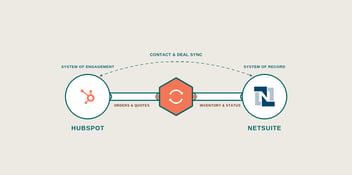
If HubSpot isn’t integrated with your ERP, finance platform, or project management tool, AI is working with a partial picture. Breeze can surface buyer activity in the CRM, but if order history, service tickets, and project status live somewhere else, the intelligence misses most of the story.
Automation Without Adoption
If your team isn’t using the CRM consistently, AI accelerates the gap between what’s tracked and what’s actually happening. Automation built on top of low adoption produces confidence-looking reports that don’t reflect reality.
Agents Without Governance
The autonomous agents (Prospecting, Customer, Data) operate without human approval on individual actions. That’s powerful, but it requires defined rules, regular output reviews, and someone accountable for what the agents are doing. Turning them on without that structure will just create noise.
The pattern here is consistent: the tools work when the system works. AI doesn’t fix a broken process — it reveals it faster. This is actually useful information if your team is willing to act on it.
If your team is looking at HubSpot AI but isn’t sure the underlying system is ready to support it, reach out to us. We help B2B teams build the CRM structure, data architecture, and workflow design that make AI output actionable.
How to Turn on HubSpot AI Tools (Breeze) in Your Portal
Start with Breeze Assistant. It requires no configuration and builds team familiarity before you move into agents and more complex features.
Here’s where to find all the HubSpot AI tools when you’re ready.
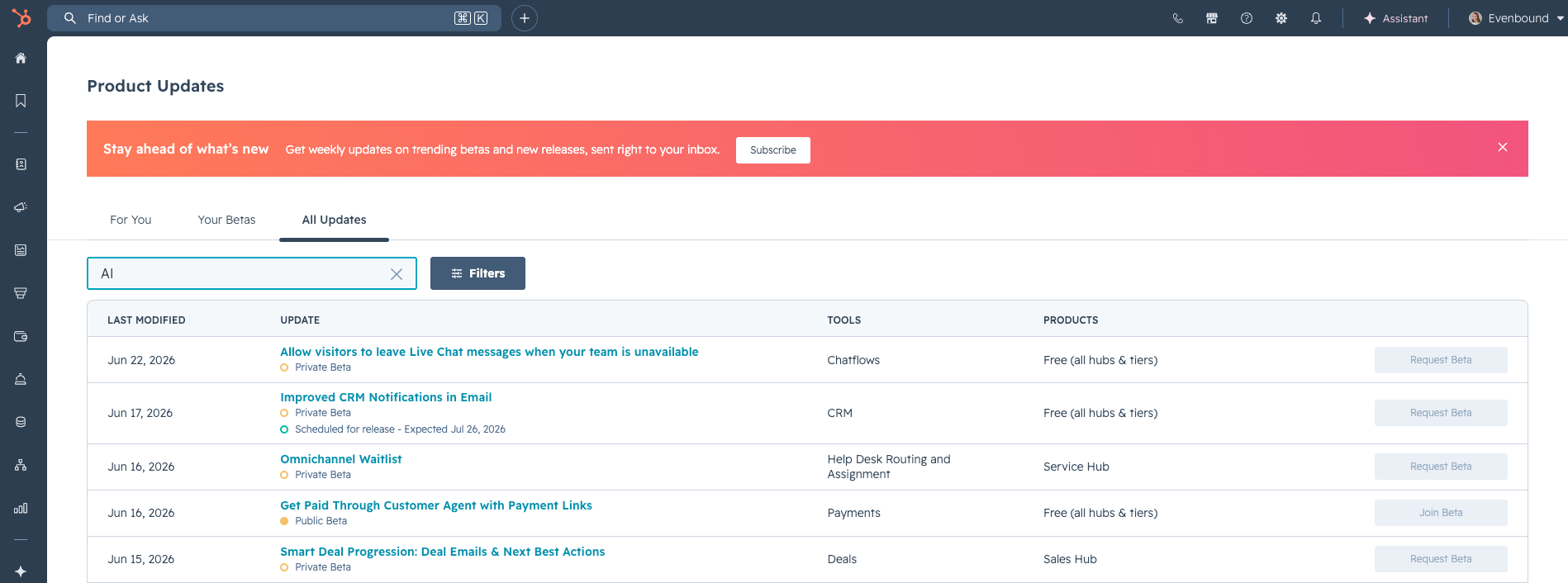
Step 1. Check for Beta Features in Product Updates
Some Breeze tools, including newer agents, may still be in beta for your portal. Check availability before trying to configure them.
- Click your profile icon in the top-right corner of HubSpot
- Select Product Updates
- Search for “AI” or scroll through available updates
- Find Breeze Assistant or Agent tools and click “Join Beta” if eligible
- Review and accept the beta terms
Step 2. Enable AI Features in Settings
This is where you turn on core Breeze features and control who has access.
- Click the Settings icon in the top-right of your HubSpot portal
- Scroll the left sidebar to find AI
- From here, you can:
- Grant users access to generative AI tools
- Enable Breeze Assistant access for your team
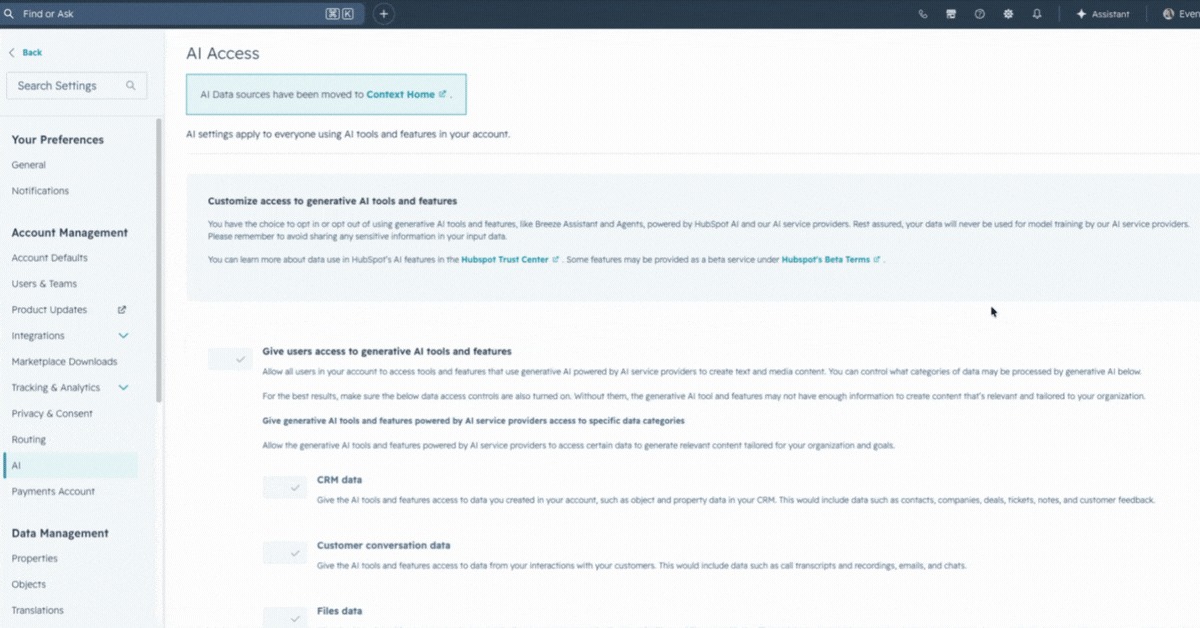
Pro tip: You’ll need administrator access to manage these settings. If the AI section isn’t visible, contact your portal admin.
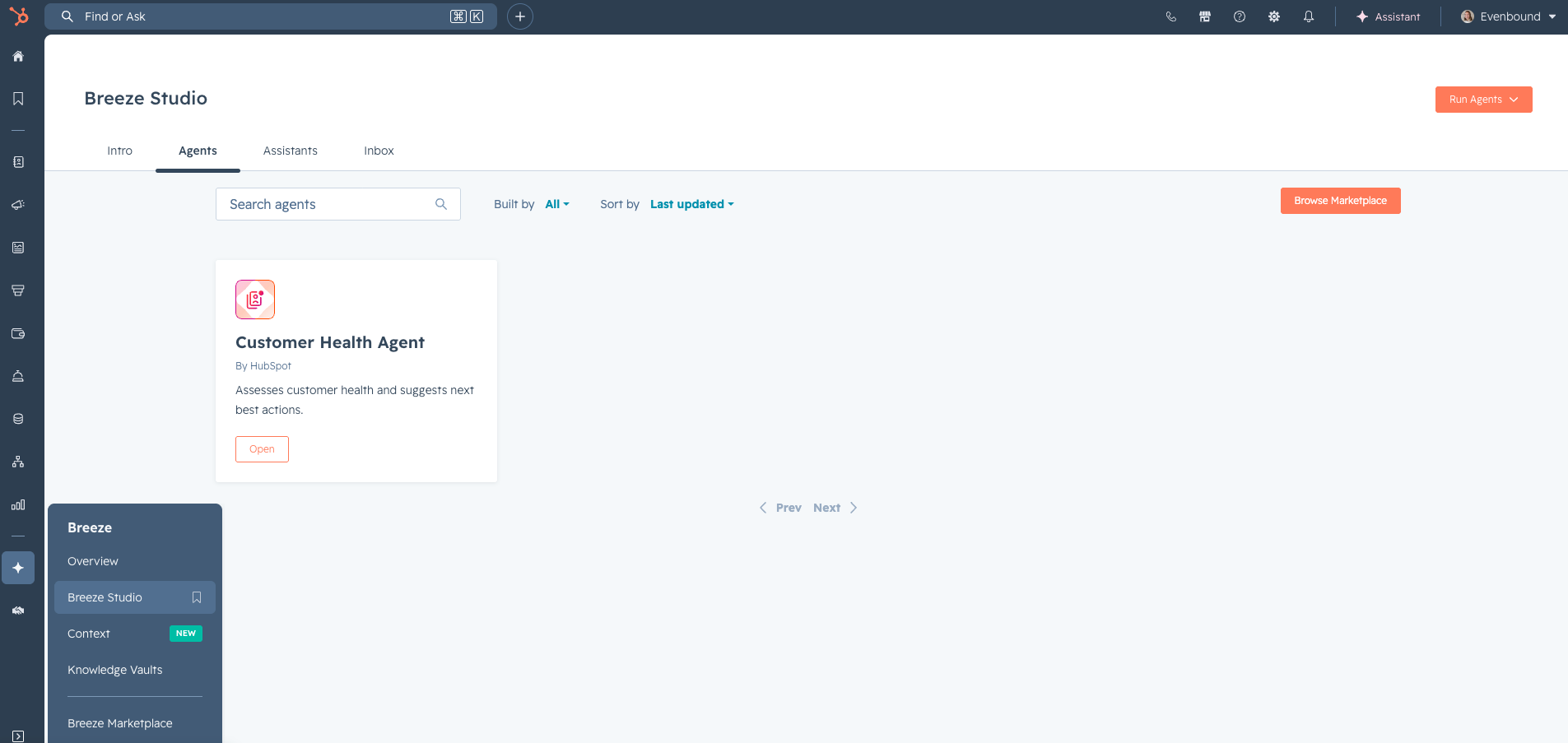
Step 3. Access Breeze from the Left Navigation
Once features are enabled, this is your home base for all Breeze tools.
- Click Breeze from the left-hand navigation menu
- Click Overview
- From here, you can navigate to:
- Breeze Assistant
- Agents (Prospecting, Customer, Data, Custom)
- Intelligence

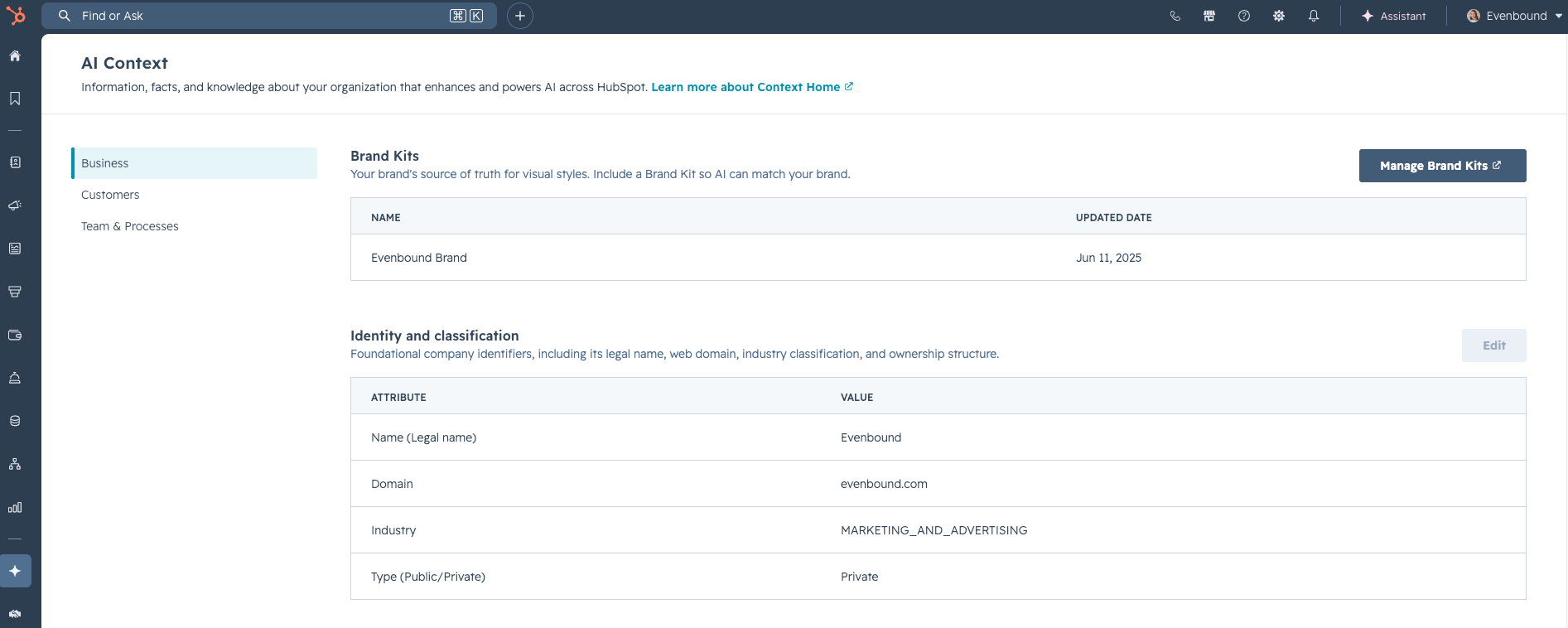
Step 4. Upload Context to Improve AI Output
This step is skipped constantly, and it’s one of the biggest reasons teams get generic outputs from HubSpot AI tools.
Inside Settings > AI > AI Context, upload:
- Brand guidelines and tone documentation
- ICP documentation
- Product or service descriptions
- Case studies or example content
The more context HubSpot has about your business, the more relevant the output from the AI tools will be.
Step 5. Deploy Agents One at a Time
Don’t activate all agents at once. Start with the one most relevant to your team’s biggest time drain, validate output, then expand.
- Start with Breeze Assistant if the goal is faster content and email drafting.
- Start with Prospecting Agent if the goal is increasing outreach volume.
- Start with Customer Agent if the goal is reducing service ticket load.
- Start with Data Agent if the goal is reducing manual data entry or keeping records accurate.
After activating an agent, review its output against known-good records for the first two to four weeks before relying on it at scale.
Not Sure If Your CRM Is Ready to Support HubSpot AI Tools?
Talk to our team. We’ll help you figure out what needs to be in place before you build on top of it.