When we talk with manufacturers about CRM strategy, most conversations start with lead generation, sales pipelines, and revenue growth. But there's a critical part of the customer journey that often gets overlooked: what happens after the deal closes.
For many industrial manufacturers, the biggest operational bottleneck isn't generating leads or closing deals—it's what happens after the contract is signed. Important project details get buried in emails. Customer expectations get lost between departments. Operations teams are left piecing together information that sales teams gathered weeks or months earlier.
That's why HubSpot's new Projects Object caught our attention.
For the first time, HubSpot is creating a more structured way to manage post-sale work directly within the CRM. For manufacturers managing installations, onboarding processes, engineering projects, and customer implementations, this represents a major step forward in HubSpot project management.
Let's take a closer look at what the Projects Object is, how it works, and why it could help manufacturers create smoother transitions from sales to delivery.
What Is HubSpot's New Projects Object?
Quick Answer:HubSpot's Projects Object is a CRM object designed to help businesses manage project-based work after a sale has been closed. It creates a centralized place to track project details, ownership, milestones, timelines, and customer requirements. |
Think of it this way:
A deal helps you win the business.
A project helps you deliver on what you sold.
For industrial manufacturers, that's a meaningful distinction.
Why Do Sales-to-Delivery Handoffs Fail?
The handoff problem isn't unique to any one type of project or manufacturer. It shows up across the full range of complex post-sale work: equipment installations, custom fabrication and engineering engagements, service contract onboarding, multi-phase rollouts, and capital deployments that span multiple sites.
What these projects have in common is that they all depend on information collected during the sale (customer requirements, scope details, stakeholder contacts, timelines, etc.) that rarely makes it to the delivery team in a usable form.
Instead, most organizations are still moving that information manually: through email threads, shared spreadsheets, internal meetings, and notes scattered across multiple systems. Every manual transfer is a chance for something to get lost, misread, or simply never passed along.
That's not a people problem. It's a system problem. The tools don't connect, so the people have to fill the gap — and they do, until they don't.
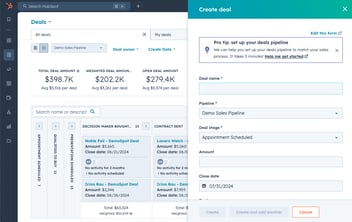
Projects vs. Deals: What's the Difference?
Deals Close Business. Projects Deliver It.
The Projects Object helps manufacturers avoid using deals as project management tools and instead create a dedicated workflow for delivery and implementation.
More importantly, it helps bridge the gap between revenue operations and operational execution. Instead of sales operating in one system and delivery teams operating in another, organizations can create a connected workflow that supports the entire customer lifecycle.
|
Deals: |
Projects: |
|
Track revenue opportunities |
Track project execution |
|
Owned primarily by sales |
Owned primarily by delivery teams |
|
Focused on closing business |
Focused on fulfilling commitments |
|
Measure pipeline performance |
Measure project progress |
How HubSpot Project Management Closes the Gap Between Sales and Delivery
The real value comes from creating a structured process.
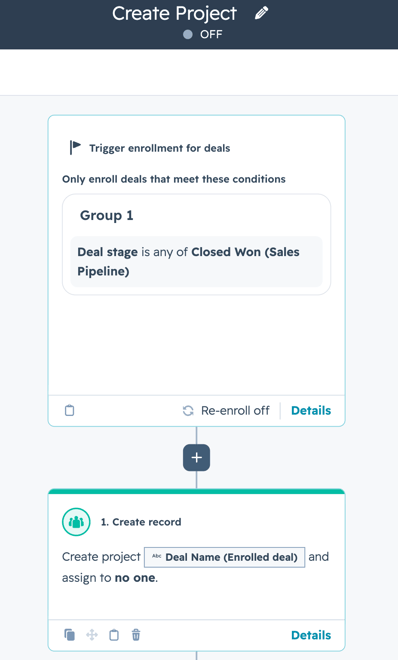
When a deal moves to Closed Won, organizations can automate the creation of a project record that includes:
- Customer requirements
- Project scope
- Stakeholder information
- Timelines and deadlines
- Internal ownership assignments
- Documentation and supporting files
Instead of manually transferring information between teams, the project becomes the central source of truth.
Setting Up the Projects Object in HubSpot: Step-by-Step
If you’re interested in setting up the projects object in your HubSpot account, you can follow the steps below:
- Navigate to the Data Model section under Data Management in the Menu
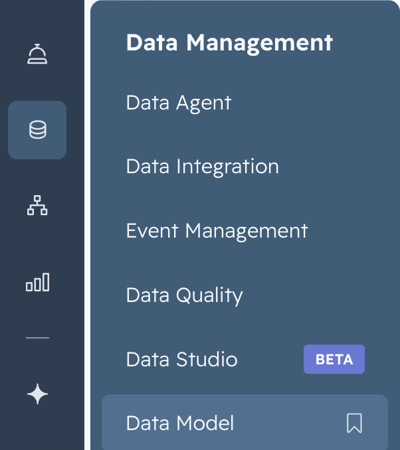
- Click the “Edit Data Model” button in the top right corner

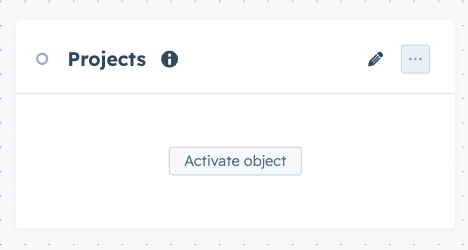
- Find the Projects object and click “Activate Object”
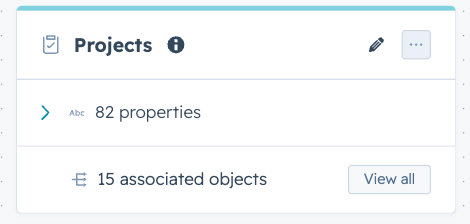
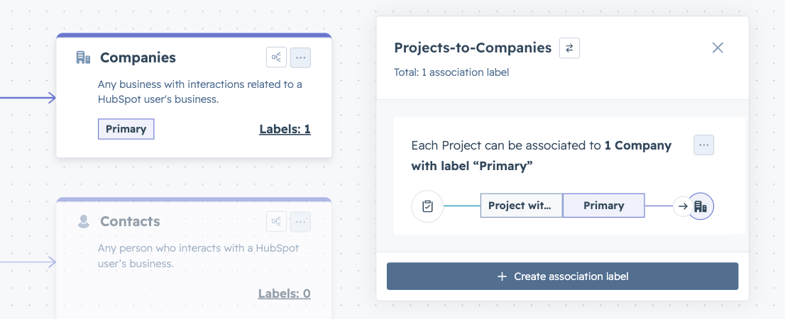
- Click the “View All” button on the Projects card to set up default associations and association labels
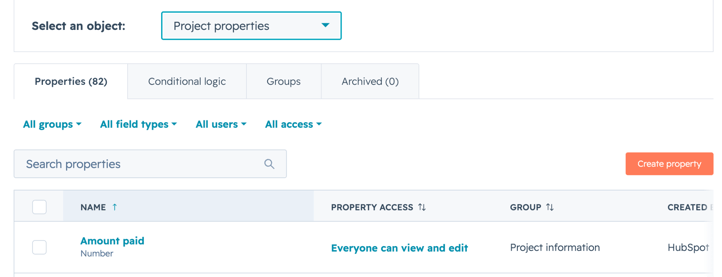
- Create custom properties to be used for tracking project-specific information
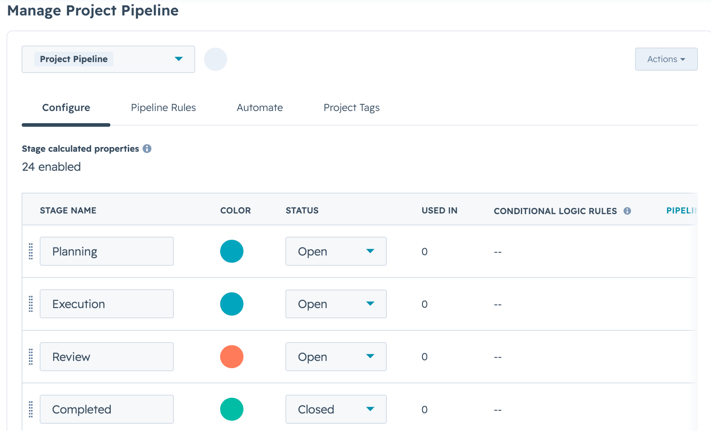
- Set up the project pipeline to track the stages that each project falls into
- Build out a workflow to automatically create a project in the account once a deal has been moved to closed won
What This Means for Your Operations: 5 Key Takeaways
If you're evaluating whether the Projects Object is worth adding to your HubSpot setup, here's where the operational impact is most evident.
1. Standardize Handoffs to Reduce Risk
One of the biggest causes of project delays is inconsistent information transfer between departments.
With HubSpot project management workflows, manufacturers can create required handoff fields that sales teams must complete before a deal can be marked Closed Won. This helps ensure project teams receive the information they need from day one.
The result is fewer surprises and faster project launches.
2. Connect Project Data Across Every Team
Many manufacturers struggle because project information lives in separate systems.
The Projects Object helps centralize customer conversations, project details, contacts, companies, and associated deal information within HubSpot.
This gives operations, engineering, customer service, and leadership teams greater visibility into project status without relying on constant internal communication.
3. Give Leadership a View Into Post-Sale Execution
Manufacturers often have strong sales reporting but limited visibility into project execution.
With Projects tied directly to customers, deals, and delivery milestones, leadership teams can monitor:
- Active projects
- Project completion rates
- Delayed implementations
- Resource utilization
- Time from sale to customer go-live
This helps executives identify bottlenecks before they impact customer satisfaction.
4. Automate Repetitive Project Setup Tasks
Every manual handoff introduces the possibility of human error.
Manufacturers can use workflows to automatically:
- Create project records
- Assign project managers
- Generate implementation tasks
- Schedule kickoff activities
- Notify delivery teams
Automation helps teams spend less time on administrative work and more time serving customers.
5. Improve the Customer Experience After the Sale
Customers don't care where sales ends and operations begins. They expect a seamless experience from contract signing through project completion.
When teams have access to accurate information and clear accountability, projects start faster, communication improves, and customers feel confident that their expectations are being met.
How We're Using This with Industrial Clients
Here's what we see consistently with industrial manufacturers: the CRM investment is in place, the sales process is documented, and the pipeline looks clean right up until the deal closes.
After that, the system goes quiet. Customer expectations sit in a salesperson's inbox. Project scope lives in a folder no one else can find. The operations team is starting from scratch on information that took weeks to gather.
The gap isn't in sales or delivery. It's between them.
That's the problem the Projects Object is positioned to solve. For manufacturers managing complex implementations, installations, or onboarding workflows, it provides a way to extend HubSpot beyond revenue recognition and into the work that determines whether a customer comes back.
We're already exploring how to incorporate this into the HubSpot systems we build for clients — because a CRM that stops working when the deal closes isn't doing the whole job.
Ready To Build a System That Doesn't Stop at Closed Won?
Closing the deal is important, but delivering on the promise is what creates long-term customer relationships.
If projects are getting delayed, customer expectations are slipping through the cracks, or teams are operating from different versions of the truth, it's time to rethink how work moves from sales to delivery.
Let's talk about building a HubSpot system that supports the entire customer lifecycle.